
Choose a Progressive Web App when you need a faster, more affordable, search-friendly product that works across devices from one codebase. Choose a native app when your product depends on maximum performance, deep device integration, app-store distribution, or a highly polished mobile experience.
The right answer in the PWA vs native app debate depends on your users, required features, budget, launch timeline, and growth plan. A customer portal may thrive as a PWA, while a fitness tracker using background sensors will usually need native development.
PWA vs Native App at a Glance
| Factor | Progressive Web App | Native App |
| Access | Browser URL; can be installed on a home screen | Downloaded through an app store or managed distribution |
| Codebase | Usually one codebase across platforms | Platform-specific or cross-platform mobile codebase |
| Development cost | Generally lower | Generally higher |
| Time to market | Usually faster | Usually longer |
| Performance | Strong for most content and workflow products | Best for graphics-heavy or device-intensive experiences |
| Device features | Available, but browser and platform support varies | Broad access to platform APIs and hardware |
| SEO | Web pages can be indexed | App content is not normally indexed like standard web pages |
| Updates | Deployed directly to the web | Commonly distributed through store review and release workflows |
| Best for | SaaS, ecommerce, portals, booking, content, and MVPs | Gaming, AR, advanced camera use, Bluetooth, and background processing |
What Is a Progressive Web App?
A Progressive Web App is a web application built with web technologies that can deliver an app-like experience across supported browsers and devices.
A PWA can run from a URL, use a web app manifest for installation details, and use a service worker to support caching, offline behavior, and background capabilities. Once installed, it can appear on the user’s home screen and launch in a standalone window. MDN’s PWA documentation explains the technical foundation for these capabilities.
Because a PWA remains part of the web, it can be shared with a link and discovered through search engines. Businesses often choose Web Application Development for portals, SaaS products, ecommerce, booking tools, and dashboards where reach matters more than unrestricted hardware access.
A true PWA also needs deliberate caching, installability, performance, accessibility, and security. Simply adding a home-screen icon to a responsive website does not create a dependable PWA experience.
What Is a Native App?
A native app is a mobile application developed for a specific operating system and distributed as an installed software package.
iOS apps commonly use Apple technologies such as Swift, SwiftUI, and Xcode, while Android apps commonly use Kotlin, Java, and Android platform APIs.
Native development provides direct access to platform capabilities, system integrations, and performance tools through resources such as Apple app capabilities and the Android platform API. That makes it a strong fit for advanced camera controls, Bluetooth, biometrics, continuous location, background activity, complex animation, or intensive graphics.
Professional Mobile App Development aligns architecture, user experience, testing, store submission, and maintenance for a dedicated iOS or Android product.
PWA vs Native App: The Differences That Matter
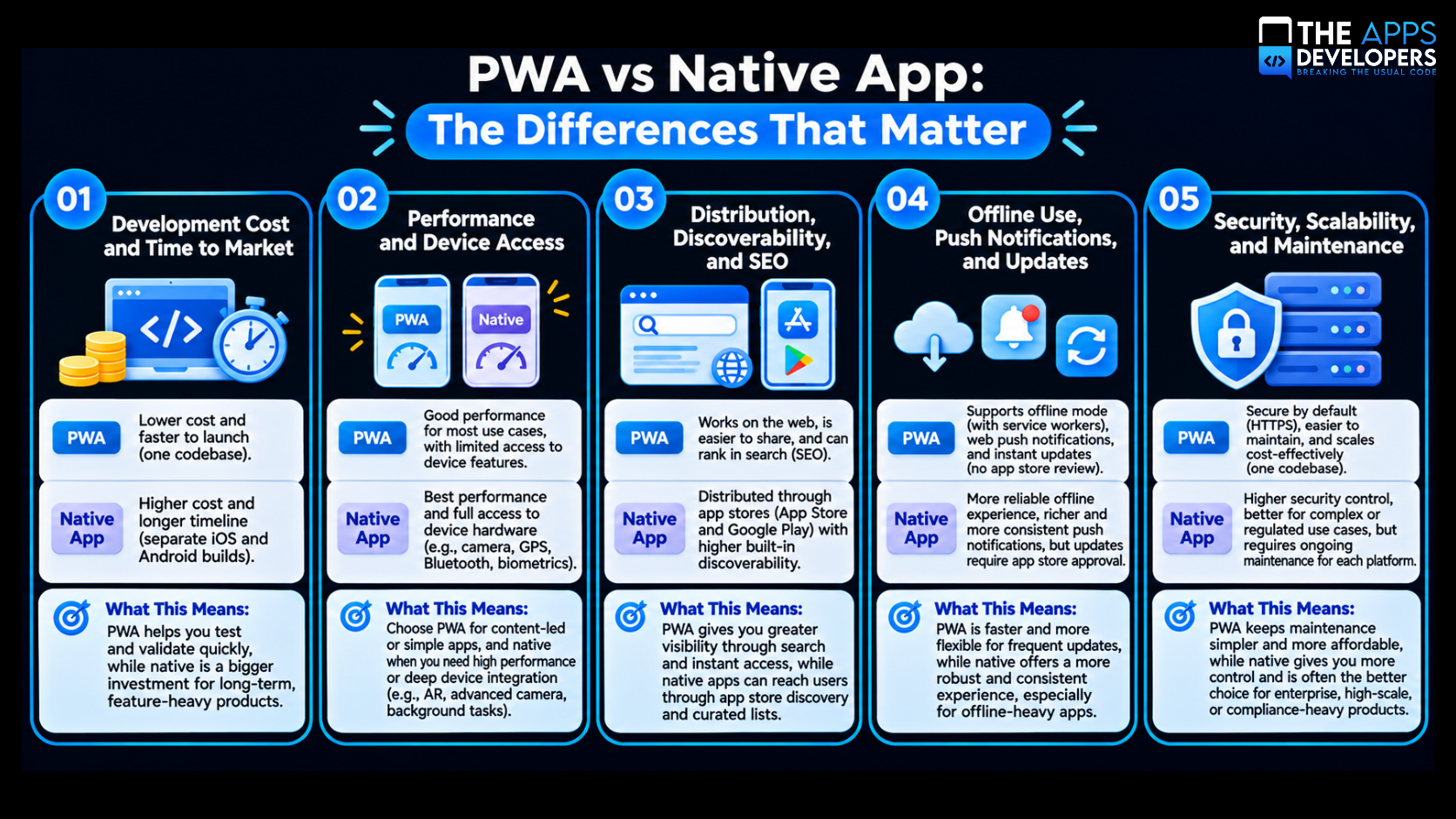
1. Development Cost and Time to Market
A PWA generally costs less to build because one web codebase can serve desktop, tablet, Android, and iOS users. Teams can develop, test, deploy, and maintain a shared product rather than managing separate platform implementations.
A native app often requires specialized engineering, device and operating-system testing, store assets, release management, and platform-specific quality assurance. Cross-platform frameworks reduce duplicated work, but mobile distribution and testing still add scope.
A PWA often suits an early-stage business validating demand. Native investment is easier to justify when mobile engagement is central to revenue or the product cannot deliver its core value without platform-specific features.
2. Performance and Device Access
Native apps have the clearest advantage when performance and hardware access define the product. They use platform tools for startup, rendering, memory, battery use, background tasks, and device services.
PWAs perform well for shopping, forms, dashboards, content, reservations, and business workflows, but advanced web API support varies. Progressive enhancement keeps core tasks broadly available while activating enhanced features where supported.
The practical question is not simply, “Can a PWA use the camera?” It often can. The better question is, “Does this product need precise, continuous, or platform-specific camera behavior that must work consistently across target devices?” If the answer is yes, native development is safer.
3. Distribution, Discoverability, and SEO
A PWA removes much of the friction between discovery and use. A customer can find a page through search, open it immediately, complete a task, and later install the experience.
That is especially valuable for businesses that rely on SEO, paid search, social sharing, email campaigns, or link-based referrals. Product, category, and service pages can bring users directly into the experience without requiring an app-store visit first.
Native apps benefit from app-store presence, ratings, reviews, and store trust, but publishing and some updates pass through review workflows. Google Play’s official publishing guidance explains how app changes move through defined review and publishing statuses.
If acquisition depends on searchable pages and instant access, a PWA has an advantage. If ratings, subscriptions, app-store rankings, or store distribution are central to the business model, native may be stronger.
4. Offline Use, Push Notifications, and Updates
Both approaches can work offline, but the depth differs. A PWA uses service workers and caching to keep selected screens and data available. Native apps can store more data locally and manage richer background behavior.
Apple supports Web Push for Home Screen web apps on iOS and iPadOS 16.4 or later. Teams must still test browser, platform, permission, and notification behavior against their actual audience.
PWA updates deploy centrally, allowing users to receive current web code without manually downloading an update. Native teams must plan for store review, staged rollout, operating-system compatibility, and user adoption of new versions.
5. Security, Scalability, and Maintenance
Neither option is automatically secure. Security depends on architecture, authentication, encrypted transport, data handling, testing, monitoring, and incident response.
A PWA may simplify front-end maintenance, but it still needs secure APIs and scalable infrastructure. The Apps Developers’ API & Backend Development and DevOps & Cloud Solutions services support the systems that keep both web and mobile products fast, available, and secure.
Native apps add store releases, operating-system versions, device fragmentation, and sometimes separate iOS and Android development. In return, they provide tighter control over platform behavior and a more consistent path to advanced device features.
When a PWA Is the Better Choice
A PWA is often better when broad reach and minimal installation friction matter. Choose it when:
- Search traffic is an important acquisition channel.
- Users need access from both desktop and mobile devices.
- The product is a portal, dashboard, marketplace, booking system, ecommerce experience, or SaaS platform.
- You want to validate an MVP quickly.
- The feature set relies mainly on forms, content, accounts, payments, and standard device capabilities.
- You prefer one primary codebase and rapid web deployment.
A SaaS founder may gain more from a fast, indexable PWA than from asking every prospect to install a mobile app before experiencing the product. Long-term performance still depends on sound architecture, which is why the decisions covered in this SaaS Web App Architecture guide matter early.
When a Native App Is the Better Choice
A native app is stronger when the mobile experience is the product. Choose it when:
- The app requires advanced Bluetooth, NFC, camera, sensor, wearable, or location features.
- Smooth animation, intensive graphics, or gaming performance is critical.
- The app must perform substantial work in the background.
- App-store subscriptions, reviews, ranking, or distribution are strategically important.
- Users engage daily and expect a highly integrated mobile experience.
- The product must follow platform-specific interaction patterns closely.
Retention also depends on product design, not technology alone. Clear first-run guidance, accessible navigation, and intuitive flows should be planned through a structured UI/UX Design process and supported by proven mobile app onboarding UX patterns.
How to Choose Between a PWA and Native App
A Practical Decision Framework
Ask These Four Product Questions
- How will users discover the product? Choose a PWA when search and links drive acquisition. Consider native when app stores and repeat mobile use dominate.
- Which device capabilities are essential? List every must-have hardware and background feature, then verify PWA support on each target platform.
- What is the realistic launch budget and timeline? A focused PWA can reduce initial scope, while native development may require a larger first release.
- What experience will users expect in two years? Build for the product’s likely direction, not only today’s minimum feature list.
A Typical Startup Scenario
Imagine a startup launching a marketplace with profiles, listings, messaging, checkout, and notifications. A PWA may be the smarter first release because it supports link sharing, search visibility, desktop access, and rapid iteration.
If usage later becomes strongly mobile-first and demands richer background messaging or device integration, the business can add a native app while retaining its web platform.
Decision Shortcut
If removing the app store makes the product easier to acquire and none of its core features break, start with a PWA. If removing direct platform access weakens the product itself, choose native.
Can You Use Both a PWA and a Native App?
Yes. Many businesses use a web application for discovery and desktop access, then add a native app for high-frequency mobile users. Both products can share the same backend, APIs, authentication, and data.
This phased approach lets teams validate workflows before making a larger native investment. A consistent UI/UX design process from wireframe to launch helps keep the experience aligned across platforms.
Build the Right Product with The Apps Developers
The PWA vs native app decision affects cost, architecture, acquisition, user experience, and scalability.
The Apps Developers help businesses define an MVP, select the right platform, design the user journey, engineer the backend, and prepare for launch. Explore our app development portfolio or contact our app development team to discuss your product.
Conclusion
A PWA suits many SaaS products, portals, ecommerce platforms, and MVPs because it balances reach, cost, and speed. Native is stronger for intensive performance, advanced device features, background behavior, or daily mobile engagement.
Choose the option that supports the core user journey with the least unnecessary complexity.
Frequently Asked Questions
Is a PWA better than a native app?
A PWA is better when broad reach, SEO, fast deployment, cross-device access, and lower initial development effort are priorities. A native app is better when maximum performance, deep hardware integration, background activity, or app-store distribution is essential.
Is a PWA cheaper than a native app?
A PWA is generally cheaper because one web codebase can support multiple device types. Actual cost still depends on design complexity, backend requirements, integrations, security, offline behavior, and the quality level expected.
Can a PWA work offline?
Yes. A PWA can use a service worker and caching strategy to make selected content and workflows available offline. Full offline functionality requires deliberate product and data-sync design rather than simply enabling a single feature.
Can PWAs send push notifications on iPhone?
Yes. Apple supports Web Push for web apps added to the Home Screen on iOS and iPadOS 16.4 or later. Users must grant permission, and teams should test notification behavior across their supported devices.
Are PWAs available in app stores?
PWAs can be packaged or distributed through certain app-store pathways, but their main advantage is direct access through the web. A business should not choose a PWA solely to imitate a native store presence.
Which is better for ecommerce: PWA or native app?
A PWA is often ideal for ecommerce brands that rely on search traffic, shareable product pages, and low-friction checkout. A native app may be better for brands with a large repeat-customer base, loyalty features, frequent notifications, or advanced in-store integrations.