
The UI/UX design process moves through research, information architecture, wireframing, visual design, prototyping, usability testing, and developer handoff, in that order, with each stage’s output feeding directly into the next. Skip a stage or work out of sequence, and problems that would have cost an hour to fix in a wireframe end up costing days once they’re discovered in production.
That gate structure isn’t bureaucracy for its own sake. It’s the mechanism that catches expensive mistakes while they’re still cheap to fix. A structural problem found in a wireframe review takes minutes to correct. The same problem found after a screen is fully designed, or worse, after it’s already built, means real rework. Here’s how the process actually works, stage by stage, and why treating it as a loop rather than a straight line matters more than most teams assume going in.
What Is the UI/UX Design Process?
The UI/UX design process is a structured, iterative sequence of stages designers follow to move a product idea from a documented user need to a functioning, validated interface ready for development. It’s iterative rather than linear, since findings at any stage, especially usability testing, regularly send teams back to an earlier phase before moving forward again.
Wireframes vs. Mockups vs. Prototypes
These three terms get used loosely, and confusing them is one of the more common ways design reviews go sideways.
| Term | What It Shows | Fidelity | Purpose |
| Wireframe | Structure, layout, and hierarchy, no color or typography | Low | Validate layout and content placement before visual investment |
| Mockup | The visual layer: color, typography, branding, imagery | Medium to high | Refine look and feel once structure is approved |
| Prototype | Interactive flow simulating real user behavior | High | Test how users actually move through the product before development |
Skipping straight to a polished mockup without validating a wireframe first is a common shortcut that tends to backfire, since a visually finished screen creates a bias toward defending it even when testing later proves it doesn’t work.
The UI/UX Design Process, Step by Step
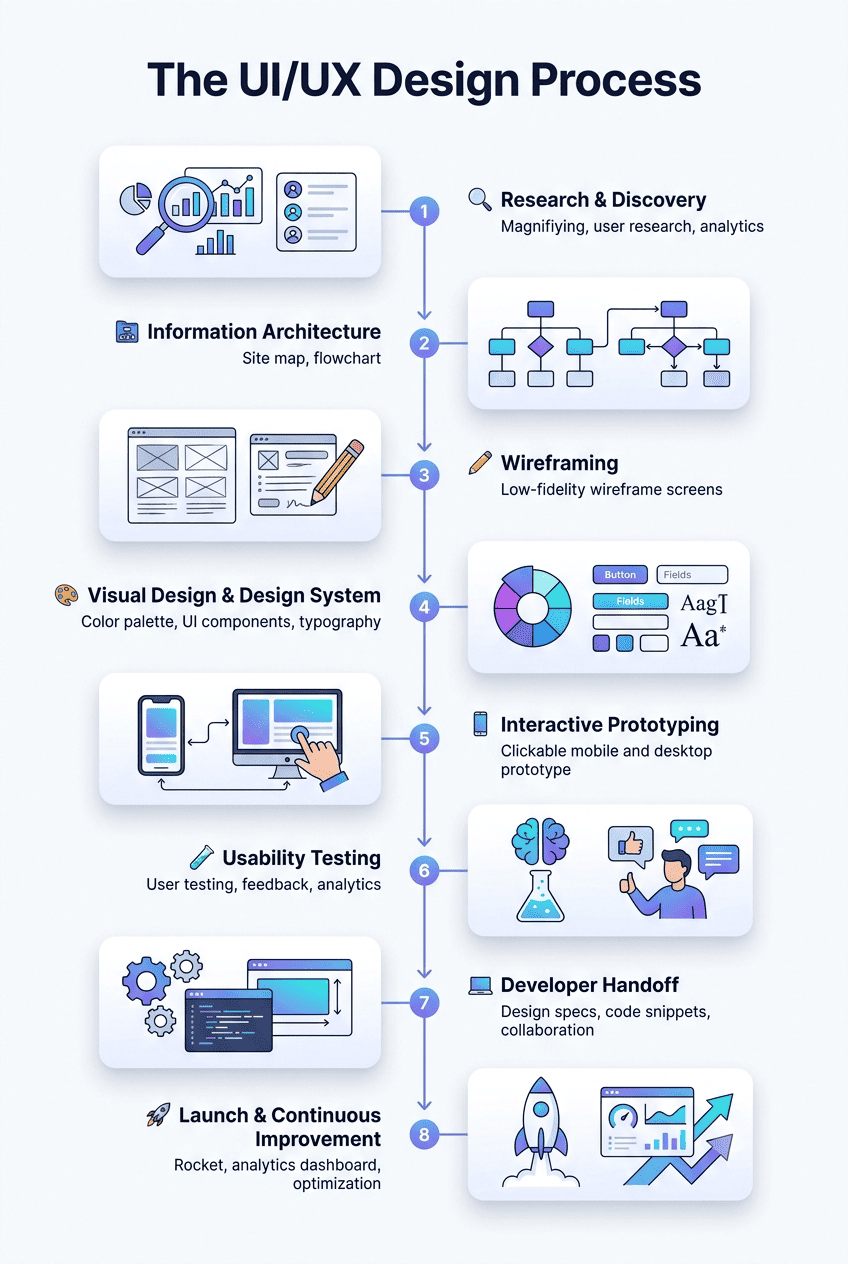
- Research and discovery. Before any tool gets opened, the team needs to understand who the user actually is, what problem they’re solving, and what success looks like. Guerrilla interviews, existing user conversations, and competitor analysis all belong here, the same lean methods covered in our guide to UX research on a budget.
- Information architecture. This stage organizes content and structures navigation before a single screen gets drawn, mapping user flows as numbered steps so stakeholders and developers can follow the logic without needing to interpret a diagram.
- Wireframing. Low-fidelity layouts define structure, hierarchy, and placement without any visual styling. This is the cheapest point in the whole process to catch a structural problem, and the point where most of them should actually get caught.
- Visual design and design system. High-fidelity screens get built using named tokens and documented component variants rather than one-off styling choices, which is where the token-first approach covered in our design systems for startups guide becomes directly relevant, not just for consistency but for how much faster future screens get built once the system exists.
- Prototyping. An interactive, clickable prototype turns static screens into something that actually simulates the real flow, letting the team validate interaction logic before committing engineering time to it.
- Usability testing. Real users attempt real tasks against the prototype, and issues get documented and resolved before anything moves to handoff. Many teams pair this with a standardized instrument like the System Usability Scale to put a consistent, comparable number on perceived ease of use across rounds of testing. Our guide to usability testing methods by budget covers how to right-size this stage for different budgets, since even a handful of test sessions at this point catches problems that are dramatically cheaper to fix now than after launch.
- Developer handoff. Annotated screens, documented component states, including empty, error, loading, and disabled states, design tokens, and interaction notes get packaged for engineering. Tools like Figma’s Dev Mode have narrowed the historical gap between what a designer intended and what a developer actually builds, though the documentation discipline behind it still matters more than the tool itself.
- Launch and post-launch iteration. Shipping isn’t the finish line. Analytics and user feedback collected after launch feed back into the next research cycle, which is exactly why this process is better understood as a loop than a straight line from idea to done.
Why Skipping Steps Costs More Than It Saves
Jumping straight to high-fidelity screens before wireframes are validated creates a real bias problem: once something looks finished, teams resist changing it even when testing proves it doesn’t work. Skipping research entirely produces designs built on assumption rather than evidence, solving the designer’s guess at the problem rather than the user’s actual one. Testing only after development, instead of against a prototype beforehand, turns what would have been a quick fix into a full sprint of rework. None of these shortcuts actually save time. They just move the cost later, where it’s bigger.
How AI Is Changing the Design Process in 2026
AI has genuinely compressed parts of this process without eliminating the need for it. Generative wireframing tools can now produce structurally sound, accessibility-compliant layouts from a basic prompt, speeding up early discovery. AI-assisted accessibility auditing catches contrast and readability issues earlier than a fully manual review would. What hasn’t changed is the underlying discipline, research still has to happen, testing still has to happen with real users, and a faster tool doesn’t replace the judgment needed to interpret what that research and testing actually reveal.
Common Mistakes That Undermine the Process
Treating UX and UI as separate handoffs rather than a continuous conversation is a frequent one, since navigation structure and visual hierarchy genuinely need to be designed together, not passed sequentially like a relay race. Running usability testing only at the very end, instead of against a prototype before development starts, is another costly pattern. And treating handoff as the finish line rather than a transition point tends to leave the design system undocumented and the post-launch iteration loop forgotten entirely.
How This Connects to the Rest of Your App
The design process doesn’t happen in isolation from engineering. It needs to be planned alongside Mobile App Development from the start, since a design process that never talks to engineering constraints tends to produce beautiful screens that are expensive or impossible to build as specified. If you’re evaluating who should actually run this process for your product, our guide to choosing a UI/UX design partner covers what to look for beyond a polished portfolio.
How The Apps Developers Approaches the Design Process
We run this process as a genuine loop, not a checklist to move through once. Research shapes wireframes, testing shapes the design system, and handoff documentation gets built with the same rigor as the visual design itself, all under our UI/UX design work. If you want a process that actually catches problems while they’re still cheap to fix, we’re glad to walk you through how we run it.
Conclusion
The UI/UX design process works because it’s structured as a series of checkpoints, not a straight line from idea to shipped product. Research validates the problem, wireframes validate structure, prototypes validate interaction, and testing validates all of it before a single line of production code depends on any of those assumptions being right.
If you’re planning a product and want a design process built to catch problems early instead of after launch, get in touch. We can walk you through how we’d run it for your specific product.