
JavaScript is the dynamic language that runs in every browser, while TypeScript is JavaScript with optional static types that catch errors before your code runs. Choose JavaScript for small projects, quick prototypes, and simple scripts. Choose TypeScript for larger apps, growing teams, and code you’ll maintain for years. Every JavaScript file is valid TypeScript, so you can start with one and move to the other gradually.
Most JavaScript developers have lived through some version of this moment. The app works perfectly in testing. Then, in production, a user clicks a button and the screen goes blank. The cause? A function expected a number and got a string, or tried to read a property from something that was undefined. JavaScript never complained, because it doesn’t check types until the code actually runs.
TypeScript was built to catch exactly those mistakes earlier. But it also adds a build step, a learning curve, and some extra typing. So which one should you use? In this TypeScript vs JavaScript guide, we’ll cover the real differences, show code side by side, explain how to set up TypeScript, and help you decide for your next project. It’s the same decision our team makes at the start of every web application development project.
TypeScript vs JavaScript at a Glance
Here’s a quick JavaScript vs TypeScript comparison, or TS vs JS, as developers often shorten it.
| Factor | JavaScript | TypeScript |
| Created by | Brendan Eich at Netscape (1995) | Microsoft (2012) |
| Type system | Dynamic, checked at runtime | Static and optional, checked before runtime |
| Runs in browsers directly | Yes | No, it’s compiled or stripped to JavaScript first |
| Build step | Optional | Usually required (some runtimes now run it directly) |
| Error detection | Mostly at runtime | Many errors caught while you write code |
| Editor support | Good | Excellent autocomplete, refactoring, and navigation |
| Learning curve | Easier to start | Requires learning types on top of JavaScript |
| File extensions | .js, .jsx | .ts, .tsx |
| Best for | Small projects, prototypes, simple scripts | Large apps, teams, long-term codebases |
Is JavaScript and TypeScript the Same?
No. TypeScript and JavaScript are not the same, but they’re closely related. TypeScript is a superset of JavaScript, which means it includes all of JavaScript and adds a type system on top.
Any valid JavaScript is also valid TypeScript syntax. The difference is that TypeScript can check your code for type errors before it runs, then outputs plain JavaScript for browsers and servers to execute.
What Is JavaScript?
JavaScript is a dynamic, high-level programming language that runs in every web browser and, through runtimes like Node.js, on servers as well.
It powers interactive web pages, single-page apps, mobile apps through frameworks like React Native, and backend services. JavaScript is standardized as ECMAScript, and new features are added every year. Its biggest strength is flexibility: you can write code and run it instantly, with no setup. That same flexibility is also what lets certain bugs slip through.
What Is TypeScript?
TypeScript is an open-source programming language from Microsoft that adds optional static types to JavaScript, letting tools find errors and improve autocomplete before code runs.
You describe what kind of data your variables, functions, and objects should hold. The TypeScript compiler then checks that your code matches those descriptions. Once it’s happy, it removes the types and produces normal JavaScript. The official TypeScript Handbook is the best place to learn the language in depth.
Is JavaScript a Subset of TypeScript?
Yes. Since TypeScript is a superset of JavaScript, JavaScript is a subset of TypeScript. That’s why you can rename a .js file to .ts and start adding types one line at a time.
The Difference Between TypeScript and JavaScript, in Code
Here’s a small example that shows the practical difference between JavaScript and TypeScript.
JavaScript:
function calculateTotal(price, quantity) {
return price * quantity;
}
calculateTotal(“20”, 3); // 60, works by accident
calculateTotal(undefined, 3); // NaN, fails silently at runtime
TypeScript:
function calculateTotal(price: number, quantity: number): number {
return price * quantity;
}
calculateTotal(“20”, 3);
// Error: Argument of type ‘string’ is not assignable to parameter of type ‘number’.
In JavaScript, the mistake only shows up when a user hits it. In TypeScript, your editor underlines it in red before you even save the file. That’s the whole idea in one example.
TypeScript vs JavaScript: Key Differences
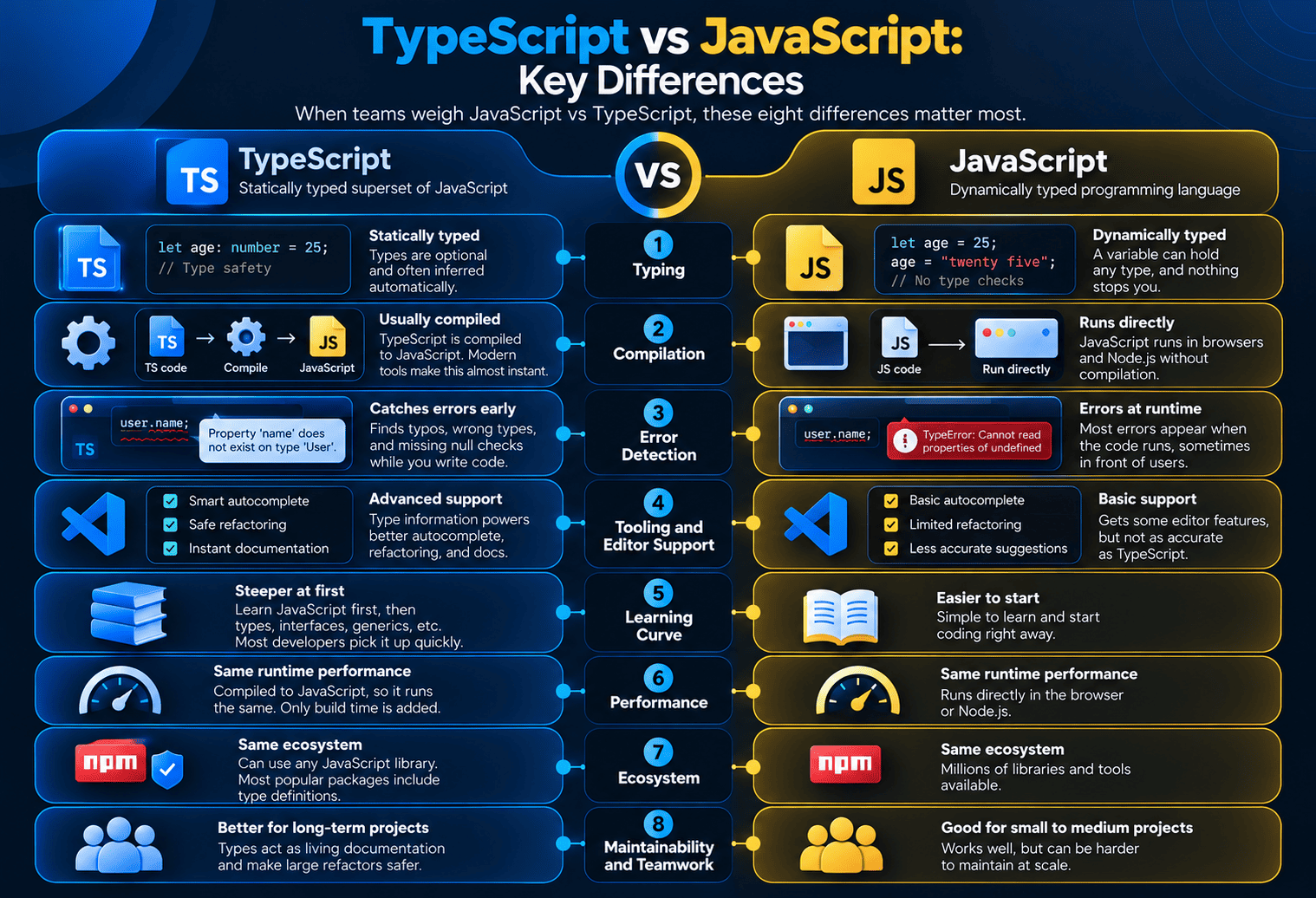
When teams weigh JavaScript vs TypeScript, these eight differences matter most.
1. Typing
JavaScript is dynamically typed. A variable can hold a number now and a string later, and nothing stops you. TypeScript is statically typed, but the types are optional and can often be inferred automatically, so you don’t have to annotate everything.
2. Compilation
JavaScript runs directly in browsers and Node.js. TypeScript usually goes through a compile step that checks types and outputs JavaScript. Modern tools like Vite and esbuild make this step almost instant, and runtimes like Deno, Bun, and recent versions of Node.js can now run TypeScript files directly by stripping out the types.
3. Error Detection
JavaScript errors mostly appear at runtime, sometimes in front of users. TypeScript catches a whole class of mistakes, like typos in property names, wrong argument types, and missing null checks, while you’re still writing code.
4. Tooling and Editor Support
TypeScript’s type information powers smarter autocomplete, safer “rename everywhere” refactoring, and instant documentation in your editor. JavaScript gets some of this too, but TypeScript’s version is much more accurate.
5. Learning Curve
JavaScript is easier to start with. TypeScript requires learning JavaScript first, then concepts like interfaces, generics, and union types. Most developers find the basics take days, not months.
6. Performance
There’s no runtime performance difference between TypeScript and JavaScript. TypeScript is turned into JavaScript before it runs, so the browser or server executes the same kind of code. The only cost is build time, and Microsoft is working on that too.
7. Ecosystem
Both share the same ecosystem, since TypeScript can use any JavaScript library. Most popular packages now ship their own type definitions, and those that don’t usually have community-maintained types available.
8. Maintainability and Teamwork
This is where TypeScript earns its keep. Types act as living documentation, so new team members understand code faster, and large refactors are far less risky. The bigger the codebase and the team, the bigger the benefit.
TypeScript’s Core Benefits Over JavaScript
- Fewer bugs reach production. A study from researchers at University College London and Microsoft Research, To Type or Not to Type, found that static type checkers like TypeScript could have detected about 15% of the public bugs they analyzed in JavaScript projects.
- Safer refactoring. Rename a function or change a data shape, and the compiler shows every place that needs updating.
- Better autocomplete. Your editor knows exactly what properties and methods are available.
- Self-documenting code. Function signatures tell you what goes in and what comes out.
- Easier onboarding. New developers can explore a codebase with confidence.
- Better results with AI coding tools. Clear types give AI assistants more context, which tends to produce more accurate suggestions.
- Gradual adoption. You can add TypeScript one file at a time.
How to Set Up a TypeScript Environment
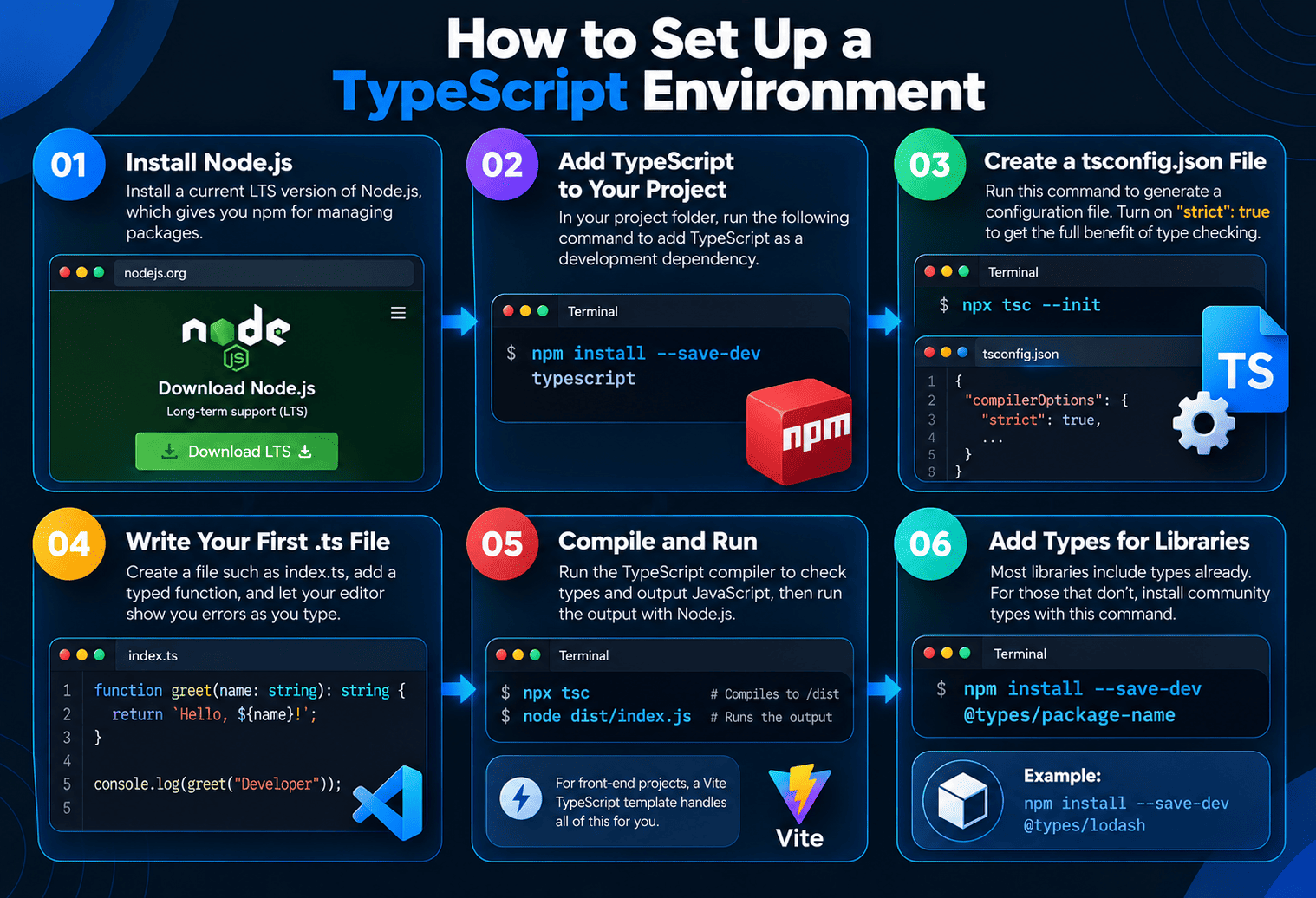
Step 1: Install Node.js
Install a current LTS version of Node.js, which gives you npm for managing packages.
Step 2: Add TypeScript to Your Project
In your project folder, run npm install –save-dev typescript to add the compiler as a development dependency.
Step 3: Create a tsconfig.json File
Run npx tsc –init to generate a configuration file. Turn on “strict”: true so you get the full benefit of type checking from the start.
Step 4: Write Your First .ts File
Create a file such as index.ts, add a typed function, and let your editor show you errors as you type.
Step 5: Compile and Run
Run npx tsc to check types and output JavaScript, then run the output with Node.js. For front-end projects, a Vite TypeScript template handles all of this for you.
Step 6: Add Types for Libraries
Most libraries include types already. For those that don’t, install community types with npm install –save-dev @types/package-name.
Is TypeScript Harder Than JavaScript?
TypeScript is a little harder at first, because you need to understand JavaScript plus a type system. Most developers become comfortable with the basics quickly, and many find TypeScript easier in the long run because the editor catches mistakes for them.
The tricky parts usually come later, with advanced features like generics and conditional types. The good news is that you can be productive for months without needing them.
Is TypeScript Frontend or Backend?
TypeScript is both. It works anywhere JavaScript works, including front-end frameworks in the browser and back-end services on the server.
On the front end, React, Angular, Vue, and Svelte all support TypeScript, and Angular uses it by default. If you’re building with React, you can hire React developers who work in TypeScript as standard practice.
On the back end, TypeScript is widely used with Node.js frameworks like Express and NestJS. For mobile, React Native supports TypeScript out of the box, and our React Native app development team uses it to share types between apps and APIs.
TypeScript vs Node.js: Not an Either-Or Choice
People often search for “TypeScript vs Node.js,” but they aren’t alternatives. Node.js is a runtime that executes JavaScript on the server. TypeScript is a language that compiles to JavaScript. You write TypeScript, and Node.js runs it.
In fact, recent versions of Node.js can run TypeScript files directly by removing the type annotations at load time, which makes the combination even simpler. Most modern Node.js projects are written in TypeScript, and our team can help you hire Node.js developers who build that way by default.
Flow vs TypeScript
Flow is a static type checker for JavaScript created by Meta. It solves a similar problem, but TypeScript has become the clear industry standard.
| Factor | TypeScript | Flow |
| Created by | Microsoft | Meta |
| Approach | A full language that compiles to JavaScript | Type annotations checked by a separate tool |
| Ecosystem and library types | Very large | Much smaller |
| Editor support | Excellent across editors | More limited |
| Best for | Almost all new projects | Existing codebases that already use Flow |
JavaScript vs TypeScript Popularity in 2026
TypeScript’s growth has been remarkable. According to GitHub’s Octoverse 2025 report, TypeScript overtook both Python and JavaScript in August 2025 to become the most used language on GitHub by monthly contributors. GitHub also noted that many popular frameworks now start new projects in TypeScript by default.
JavaScript isn’t going anywhere, though. It still runs every browser on the planet, and the JavaScript and TypeScript ecosystem together is the largest in software development.
When to Choose JavaScript or TypeScript
Choose JavaScript If You:
- Are writing a small script, a quick prototype, or a one-off tool.
- Are just learning to code and want to understand the basics first.
- Need to add a little interactivity to a mostly static website.
- Work in an environment where adding a build step isn’t practical.
Choose TypeScript If You:
- Are building an app you’ll maintain for more than a few months.
- Work with a team, especially one that’s growing.
- Have complex data flowing between front end, back end, and APIs.
- Want safer refactoring and better editor support.
- Plan to use frameworks like Angular, NestJS, or Next.js, where TypeScript is the norm.
| Project Type | Better Choice |
| Quick prototype or hackathon | JavaScript |
| Small marketing site with light interactivity | JavaScript |
| SaaS product or business web app | TypeScript |
| Enterprise application with many developers | TypeScript |
| Node.js API or backend service | TypeScript |
| React Native mobile app | TypeScript |
| Learning to code for the first time | JavaScript first, then TypeScript |
How to Migrate From JavaScript to TypeScript
You don’t need a big rewrite. Most teams migrate gradually:
- Add TypeScript and a tsconfig.json with allowJs turned on, so JavaScript and TypeScript files work side by side.
- Rename files from .js to .ts one at a time, starting with shared utilities and data models.
- Add types for your most important data, such as API responses and database records.
- Turn on stricter settings step by step as your codebase gets cleaner.
- Add type checking to your CI pipeline so new code stays typed.
Will TypeScript Replace JavaScript?
No. TypeScript depends on JavaScript, because it compiles down to it. What’s changing is how often teams write TypeScript instead of plain JavaScript for serious projects. There’s also an early-stage proposal to let JavaScript itself accept type annotations as comments, which could blur the line further in the future.
Microsoft is also investing heavily in TypeScript’s speed. In 2025, the team announced a native port of the TypeScript compiler written in Go, aiming for build times around 10 times faster in large projects.
Related Reading
Choosing a language is only part of building a modern web app. If you’re also choosing a front-end framework, our React vs Vue comparison covers how each works with TypeScript.
For the server side, our guide to the best backend frameworks in 2026 compares TypeScript-friendly options like Express and NestJS with Django, Spring Boot, and more.
Curious how large companies use this stack in production? See our roundup of top companies using Node.js.
Both languages are open source, too, and our guide to open source web application development explains how to manage open-source dependencies safely.
Conclusion
The TypeScript vs JavaScript question has a clearer answer in 2026 than it did a few years ago. JavaScript remains the foundation of the web and the right choice for small, simple, or experimental work. TypeScript is now the default for most serious applications, because it catches mistakes earlier, makes teams faster, and keeps large codebases manageable. And since TypeScript is just JavaScript with types, you never have to choose forever.
Planning a new web or mobile app and not sure which to use? Book a free consultation with The Apps Developers, and we’ll recommend the right language and stack for your product.
Frequently Asked Questions
What is the difference between TypeScript and JavaScript?
JavaScript is a dynamically typed language that runs directly in browsers and Node.js. TypeScript is a superset of JavaScript that adds optional static types, catches many errors before code runs, and compiles to plain JavaScript.
Is TypeScript better than JavaScript?
TypeScript is better for large projects, teams, and long-term maintenance because it catches errors early and improves tooling. JavaScript is better for small projects, quick prototypes, and learning the fundamentals.
Is TypeScript the same as JavaScript?
No. TypeScript is a superset of JavaScript, so all JavaScript is valid TypeScript, but TypeScript adds a type system and a compile step that JavaScript doesn’t have.
Is TypeScript harder than JavaScript?
TypeScript is slightly harder to start because you learn JavaScript plus types. Most developers pick up the basics quickly and find it easier over time, since the editor catches many mistakes.
Is TypeScript frontend or backend?
TypeScript is both. It’s used on the front end with React, Angular, and Vue, and on the back end with Node.js frameworks like Express and NestJS.
What is the difference between TypeScript and Node.js?
TypeScript is a programming language, while Node.js is a runtime that executes JavaScript on servers. You can write code in TypeScript and run it on Node.js.
Does TypeScript make apps run faster?
No. TypeScript has no runtime performance advantage, because it’s converted to JavaScript before running. Its benefits are fewer bugs, better tooling, and easier maintenance.
Should I learn JavaScript or TypeScript first?
Learn JavaScript first, since TypeScript is built on it. Once you’re comfortable with JavaScript basics, adding TypeScript is a natural next step.