
A single crash on launch day can undo months of development work. Industry research consistently shows that most users abandon an app after just one or two bad experiences, and they rarely come back to give it a second chance. Bugs don’t just annoy users, they show up in one-star reviews, App Store rejection emails, and churn reports that are far more expensive to fix after launch than before it.
Mobile app testing is the discipline that stands between “it works on my machine” and a product that holds up across thousands of real devices, networks, and users. This guide breaks down the types of mobile app testing, the process that ties them together, and the best practices that separate apps that scale from apps that get abandoned in beta.
Why Mobile App Testing Can’t Be an Afterthought
Testing is often treated as the last box to check before shipping, squeezed into whatever time is left after design and development. That approach almost always backfires. A bug caught during development might take an hour to fix. The same bug caught after launch, once it’s affecting live users, generating support tickets, and tanking your app store rating, can take days and cost significantly more in lost trust.
The apps that consistently perform well in the market treat testing as a parallel track running alongside development, not a final gate. That’s the same philosophy we apply across our mobile app development engagements, quality assurance isn’t bolted on at the end, it’s built into every sprint.
Types of Mobile App Testing You Need to Know

Not every app needs every type of testing at full intensity, but understanding the full picture helps you prioritize based on risk.
Functional Testing
This checks whether the app does what it’s supposed to do, buttons trigger the right actions, forms submit correctly, and features behave as specified. It’s the foundation every other type of testing builds on.
Usability Testing
Usability testing evaluates how intuitive and frictionless the app feels to a real user. This overlaps heavily with design decisions, which is why usability testing works best when it’s informed by the same principles covered in our guide to mobile app UI/UX design best practices, a confusing flow is a UX problem long before it’s a QA ticket.
Performance Testing
Performance testing measures how the app behaves under real-world conditions: slow networks, low battery, background processes competing for memory. It answers a simple question, does the app stay fast and stable when conditions aren’t perfect?
Compatibility Testing
With thousands of Android device and OS combinations alone, compatibility testing verifies the app works consistently across screen sizes, operating system versions, and hardware capabilities. Skipping this is how apps end up with five-star reviews on one device and one-star reviews on another.
Security Testing
Security testing looks for vulnerabilities, insecure data storage, weak API authentication, exposed keys, before attackers find them first. Following a structured framework like the OWASP Mobile Application Security Testing Guide gives teams a proven checklist rather than reinventing security testing from scratch. This is especially critical for apps built on top of custom API and backend development, where a single unprotected endpoint can compromise the entire system.
Automated Testing vs. Manual Testing
Automated testing runs scripted checks quickly and repeatedly, making it ideal for regression testing and CI/CD pipelines. Manual testing, done by an actual person exploring the app, remains essential for catching usability issues and edge cases that scripts don’t anticipate. The strongest QA strategies use both, automation for speed and coverage, manual testing for judgment.
Regression Testing
Every time new code ships, regression testing confirms that existing features still work as expected. Without it, teams end up in a cycle of fixing one bug and quietly introducing three more.
Localization Testing
For apps targeting multiple regions, localization testing verifies that translated text fits UI elements correctly, date and currency formats display properly, and nothing breaks when the interface switches languages or reading direction.
The Mobile App Testing Process, Step by Step
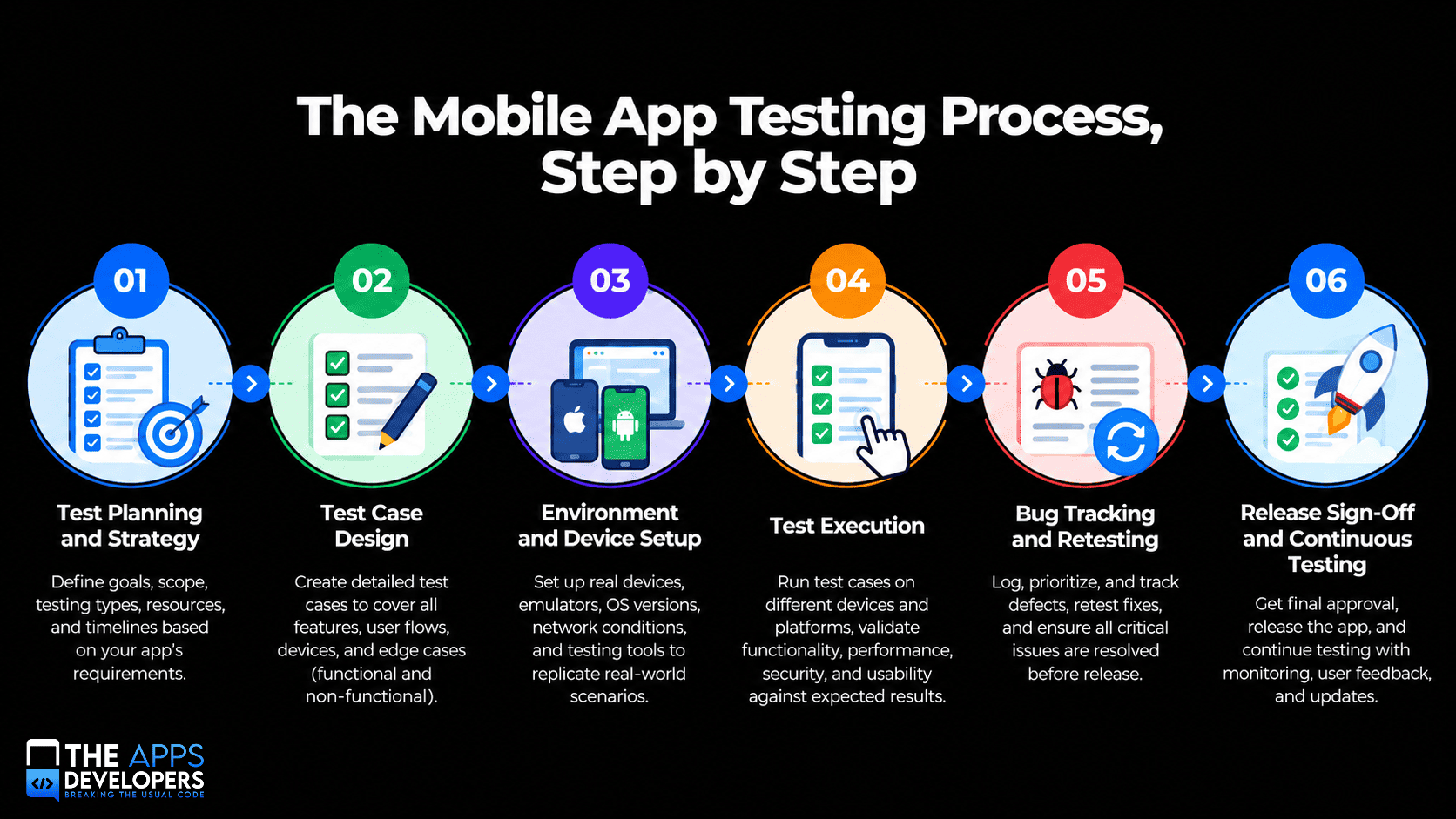
1. Test Planning and Strategy
Before any testing begins, define scope, risk areas, target devices, and success criteria. This is also where teams decide the mix of manual versus automated testing based on budget and timeline.
2. Test Case Design
Test cases translate requirements into specific, repeatable scenarios, covering expected behavior, edge cases, and failure conditions. Well-documented test cases become a reusable asset for every future release.
3. Environment and Device Setup
Testing needs to happen on real devices and operating system versions that mirror your actual user base, not just emulators. Emulators are useful for early checks, but they don’t fully replicate real-world battery, network, and hardware conditions.
4. Test Execution
This is where functional, usability, performance, security, and compatibility tests actually run, whether through manual walkthroughs or automated scripts integrated into the build pipeline.
5. Bug Tracking and Retesting
Every defect gets logged, prioritized by severity, and routed back to the development team. Once fixed, retesting confirms the issue is actually resolved, not just marked closed.
6. Release Sign-Off and Continuous Testing
Testing doesn’t stop at launch. Post-release monitoring, crash reporting, and continuous regression testing catch issues introduced by future updates, OS changes, or third-party API shifts. Teams running mature DevOps and cloud infrastructure can automate much of this cycle, so new builds are tested before they ever reach users.
Native vs. Cross-Platform Testing Considerations
The framework behind your app changes how testing gets scoped. Native apps require separate test cycles for iOS and Android, since each platform has its own UI components and behavior. Cross-platform frameworks like React Native or Flutter share a single codebase, which can reduce testing overhead, but platform-specific quirks still need dedicated checks on each OS. We break down these trade-offs in more depth in our guide to native, hybrid, and cross-platform apps, which is worth reviewing before finalizing a testing strategy.
Mobile App Testing Best Practices
- Start testing early, ideally alongside the first development sprint rather than after the build is “done”
- Prioritize by risk, focusing the deepest testing on payment flows, authentication, and data-sensitive features first
- Test on real devices, not just simulators, especially for performance and hardware-dependent features
- Automate the repetitive checks and reserve manual testing for exploratory and usability scenarios
- Track defects with context, screenshots, logs, and reproduction steps save enormous back-and-forth time
- Follow platform guidelines, including Apple’s App Review Guidelines and Google Play’s policies, so a passed QA cycle doesn’t end in a store rejection
- Keep testing continuous, not just pre-launch, since OS updates and third-party dependencies can break working features overnight
Common Mobile App Testing Mistakes to Avoid
- Testing only on the newest devices, missing the older hardware a meaningful share of users still rely on
- Treating QA as the final step instead of an ongoing part of development
- Ignoring network variability, assuming every user has a strong, stable connection
- Ignoring accessibility testing, which affects both user reach and legal compliance
- Skipping regression testing after minor updates, assuming small changes can’t break unrelated features
How Testing Impacts Business Metrics and ROI
Thorough testing isn’t just a technical safeguard, it’s a retention strategy. Crashes and bugs are among the top reasons users cite for abandoning an app after a single session. Reliable performance reduces support tickets, protects app store ratings (which directly influence organic discovery), and prevents the kind of public failure that’s expensive to recover from in both reputation and revenue.
How The Apps Developers Approaches Mobile App QA
We build testing into the mobile app development process from day one rather than treating it as a pre-launch checkbox. Our team combines manual exploratory testing with automated regression suites, tests across real device libraries, and validates security before code ever reaches production. You can see this quality-first approach reflected across our portfolio of shipped products.
Conclusion
Mobile app testing isn’t about chasing a zero-bug fantasy, it’s about catching the issues that would actually hurt users and the business before they ship. From functional checks to security audits, every type of testing covered here exists to protect the thing that matters most: a user’s trust in your app working the way it’s supposed to.
If you’re building a new app or want a QA review of one that’s already live, our team can help you ship with confidence. Get in touch to talk through your testing needs.
Frequently Asked Questions
What are the main types of mobile app testing?
The core types are functional, usability, performance, compatibility, security, regression, and localization testing, with automated and manual approaches used across all of them depending on the scenario.
What's the difference between manual and automated mobile app testing?
Manual testing involves a person exploring the app to catch usability issues and edge cases. Automated testing uses scripts to repeatedly check known scenarios, making it faster and more consistent for regression testing.
How long does mobile app testing take?
It depends on app complexity, but testing typically runs in parallel with development rather than as a separate phase. A mid-complexity app might need two to four weeks of dedicated QA before a major release, plus ongoing testing for updates.
Do small apps or MVPs need full QA testing?
Not the full scope. MVPs should prioritize functional and usability testing on core flows first, then expand into performance, security, and compatibility testing as the product scales and user numbers grow.
Why do apps still crash after passing QA?
Testing environments can’t cover every real-world combination of device, OS version, and network condition. That’s why continuous post-launch monitoring and regression testing matter as much as pre-launch QA.