
CI/CD for mobile apps means automating the build, test, code signing, and distribution steps between a developer committing code and that code reaching testers or the app stores, replacing a manual, error-prone release process with a repeatable pipeline. Setting it up properly involves six core pieces: automated builds on every commit, automated testing, code signing that doesn’t depend on one person’s laptop, automated beta distribution, a controlled store release step, and monitoring once a release ships.
Mobile CI/CD gets treated as an afterthought more often than its web counterpart, mostly because manual releases feel manageable at first, right up until a team is shipping weekly and someone’s out sick on release day, or a signing certificate expires and nobody remembers how the previous person configured it, or a beta build silently fails to reach testers for two release cycles before anyone notices. This guide is the practical setup version, not a theoretical overview, what to actually build, in what order, and what tends to go wrong along the way. If you’re scoping this as part of a broader DevOps and cloud solutions effort, this covers the mobile-specific pieces that a general CI/CD guide usually glosses over.
What Is CI/CD for Mobile Apps?
CI/CD for mobile apps is the practice of automating the build, test, and release pipeline for iOS and Android applications, using continuous integration to catch issues on every code change and continuous delivery or deployment to get validated builds into testers’ or users’ hands without manual, error-prone steps. Continuous integration (CI) covers the automated build-and-test phase, catching problems immediately after code is committed. Continuous delivery (CD) extends that to automatically preparing a release-ready build, while continuous deployment goes a step further and actually ships that build, though for mobile apps, “fully automated deployment” usually still involves a manual approval gate before something goes live to real users.
Why Mobile CI/CD Is Harder Than Web CI/CD
A web deployment pushes new code to a server the team controls, live in seconds, reversible in seconds. A mobile release depends on a third party, Apple or Google, reviewing and approving the build before it reaches users, on a timeline the team doesn’t control and can’t meaningfully expedite except in genuine emergencies. Code signing adds another layer entirely absent from web deployment, certificates and provisioning profiles that expire, that need to be shared securely across a team, and that break builds in confusing ways when they’re mismanaged. These aren’t reasons to avoid automating mobile releases, they’re exactly why automating them carefully matters more, not less, than it does for a web app.
Core Components of a CI/CD for Mobile Apps Pipeline
Continuous Integration: Automated Build and Test
Every commit or pull request should trigger an automated build and test run, catching compilation errors, failing unit tests, and broken integrations before a human ever needs to notice them manually. This is the same fast-feedback principle behind mobile app testing generally, catching a problem at the commit stage is dramatically cheaper than catching it after a build has already gone out to testers.
Code Signing Automation
Manual code signing, someone’s local machine holding the certificates, is a fragile single point of failure that breaks the moment that person is unavailable or that machine has a problem. Tools like fastlane’s match solve this by storing signing certificates securely and syncing them across the team and CI environment, removing the “only Dave knows how to sign a release build” problem that quietly plagues a lot of mobile teams.
Continuous Delivery: Beta Distribution
Once a build passes CI, it should be automatically distributed to internal testers or a beta group without someone manually exporting and uploading a build. Apple’s TestFlight and Google Play’s internal testing track both support this kind of automated distribution, letting a validated build reach testers within minutes of a merge rather than whenever someone gets around to the manual upload.
Continuous Deployment: App Store Release
The final step, actually publishing to the App Store or Google Play, is where most mature mobile CI/CD pipelines still keep a manual approval gate, given store review timelines and the real cost of a bad release reaching production users. Automating everything up to that gate, and making the actual release a single deliberate action rather than a multi-step manual process, is where most of the real time savings and risk reduction happen.
How to Set Up CI/CD for a Mobile App Team: Step-by-Step
Step 1: Choose Your CI/CD Platform
Pick a platform that supports both iOS and Android builds, GitHub Actions, Bitrise, and CircleCI are all common choices, based on where your code already lives and how much mobile-specific tooling you want built in versus configured yourself.
Step 2: Automate Code Signing
Set up centralized certificate and provisioning profile management before building out the rest of the pipeline, since every subsequent step depends on builds being signable without manual intervention.
Step 3: Configure Automated Builds on Every Pull Request
Trigger a build and test run on every pull request, not just on merges to the main branch, so problems get caught before code is even merged, not after.
Step 4: Automate Beta Distribution
Connect your pipeline to TestFlight and Google Play’s internal testing track so a passing build on the main branch reaches testers automatically, without a manual export-and-upload step in between.
Step 5: Gate Store Releases Behind Manual Approval
Keep the final store submission as a deliberate, manually triggered step, even though everything leading up to it is automated, since this is the one point in the pipeline where a human decision genuinely belongs.
Step 6: Monitor and Iterate
Track build times, failure rates, and how long it takes code to go from commit to tester’s device, then revisit the pipeline periodically rather than treating the initial setup as permanent, since both team size and app complexity change what the pipeline actually needs over time.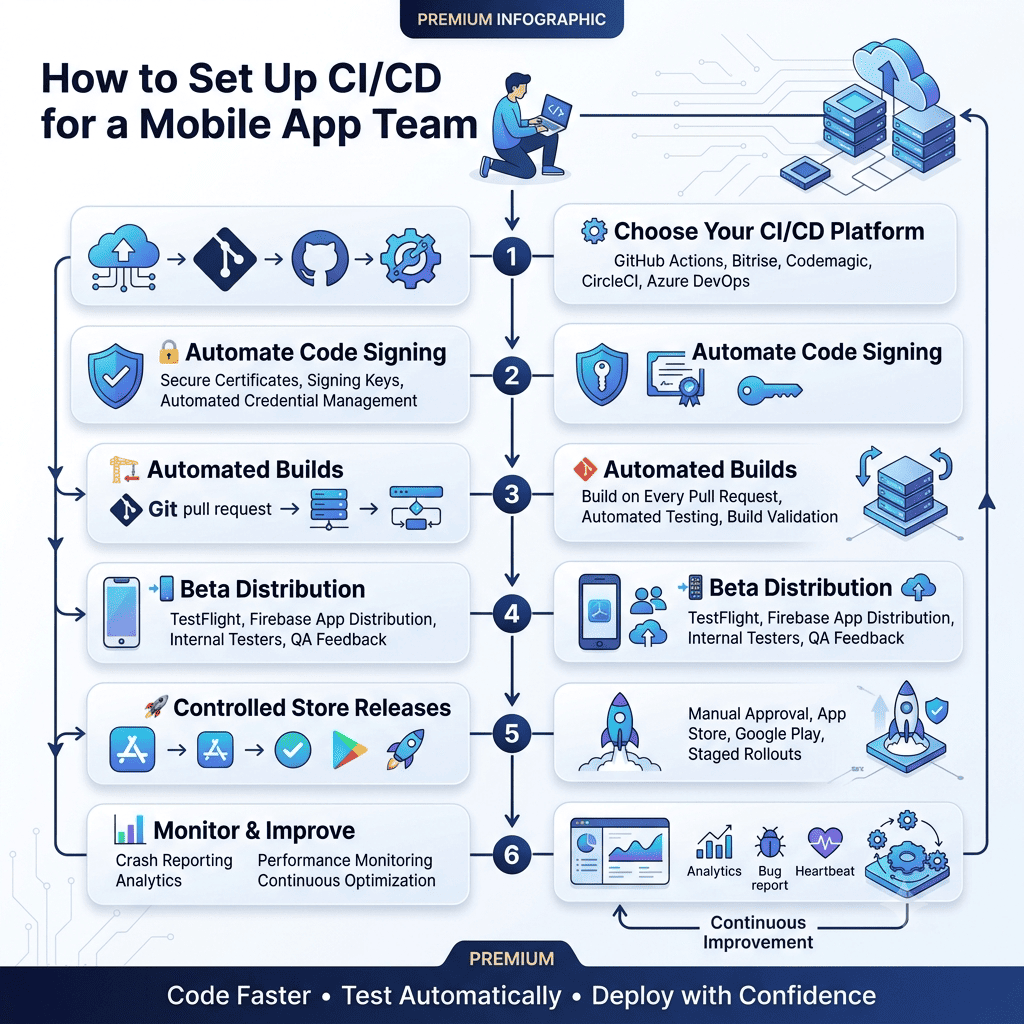
GitHub Actions vs. Fastlane vs. Bitrise: Choosing Your CI/CD Stack
These three tools solve overlapping but distinct parts of the problem, and most real setups actually combine more than one rather than picking a single winner.
Tool | What It Actually Does | Best Fit |
GitHub Actions | General-purpose CI/CD runner, triggers workflows on commits | Teams already using GitHub, wanting full control over pipeline configuration |
Fastlane | Mobile-specific automation: signing, building, uploading to stores | Any mobile team, typically used inside a CI runner rather than as a replacement for one |
Bitrise | Mobile-focused CI/CD platform with built-in mobile tooling | Teams wanting less configuration overhead, willing to use a purpose-built mobile platform |
In practice, a common and effective combination is GitHub Actions (or another general CI runner) as the orchestration layer, with fastlane handling the actual mobile-specific build, sign, and upload steps inside that pipeline, giving a team both general-purpose flexibility and mobile-specific tooling without having to choose one exclusively.
Monitoring Your CI/CD Pipeline Once It’s Running
A pipeline that isn’t monitored tends to degrade quietly, a flaky test that starts intermittently failing gets ignored until it’s failing most of the time, or a beta distribution step silently stops working weeks before anyone notices testers are stuck on an old build waiting for updates that never arrive. Tracking a handful of core metrics, build success rate, average build time, and time from commit to build reaching a tester, surfaces this kind of drift before it becomes a real problem rather than after testers have already lost confidence in the beta channel. GitHub Actions’ own documentation covers workflow monitoring and status checks in detail if that’s the orchestration layer your pipeline is built on, and the same monitoring discipline applies regardless of which specific platform ends up running the pipeline.
This connects to the same process discipline covered in our mobile app development process guide, where treating CI/CD as an ongoing, actively maintained part of the development workflow, not a one-time setup task, is what actually keeps a pipeline reliable months and years after it was first built rather than just in the first few weeks when it’s fresh and everyone remembers how it works.
Planning for Rollbacks and Hotfixes
CI/CD setup discussions tend to focus entirely on shipping forward, and skip what happens when a released build turns out to have a serious bug. Mobile releases can’t be rolled back the way a web deployment can, once a version is live in the App Store or Google Play, the previous version isn’t simply restored, a new, fixed version has to be built, signed, tested, and pushed through store review again, which takes real time even on an expedited basis. A mature CI/CD setup accounts for this by keeping a fast, well-tested hotfix path, a shortened pipeline that skips non-essential steps while still enforcing code signing and core testing, so a critical fix can move from identified bug to submitted build in hours rather than days. Feature flags are worth considering here too, since a feature that can be disabled remotely without a new release removes the pressure to rush an emergency build through the pipeline in the first place.
Common Mistakes in Mobile CI/CD Setup
Teams frequently automate the build and test steps thoroughly while leaving code signing as a manual process, which undermines a lot of the reliability the rest of the pipeline was built to provide, since a signing failure still requires someone specific to intervene manually. Beta distribution gets set up once and never revisited, so testers end up on stale builds because nobody noticed the automated distribution step silently started failing weeks earlier. Store release approval sometimes gets automated away entirely in pursuit of “full” continuous deployment, removing the one manual checkpoint that genuinely protects against a bad release reaching real users. And release notes and versioning frequently stay a manual, easily-forgotten step even after everything else is automated, which matters more than it sounds like, since inconsistent versioning is a common source of confusion during the app store optimization work that depends on a clean, trackable release history.
How The Apps Developers Approaches CI/CD for Mobile App Teams
Every Mobile App Development project we take on gets a CI/CD pipeline scoped early, not bolted on once a team is already struggling with manual releases, since the cost of retrofitting automation onto an established manual process is consistently higher than building it in from the start.
The same discipline connects to backend release coordination too, when a mobile app and its API and backend need to ship in sync, a mobile CI/CD pipeline that’s isolated from backend deployment timing creates exactly the kind of version-mismatch bugs that a coordinated release process is meant to prevent.
If your team is still releasing manually, or your CI/CD setup has grown organically into something nobody fully understands anymore, that’s worth a direct conversation. You’re welcome to talk to our team about what a properly built mobile CI/CD pipeline would look like for your specific stack.