
A reliable web app security checklist covers secure architecture, authentication, access control, data protection, API security, testing, monitoring, and incident response. Businesses should apply these controls throughout development, not simply run a security scan immediately before launch.
Web applications handle some of a company’s most valuable assets: customer details, employee records, financial information, intellectual property, and operational data. A security weakness can therefore become more than a technical problem. It can interrupt operations, damage customer trust, create compliance exposure, and increase development costs.
The challenge is that web application security is not achieved through one tool or one penetration test. It depends on decisions made during planning, architecture, development, deployment, and post-launch maintenance.
This guide provides a practical web app security checklist that business owners, product leaders, and technical teams can use to evaluate an existing application or plan a secure new product.
What Is a Web App Security Checklist?
A web app security checklist is a structured set of technical and operational controls used to reduce vulnerabilities across a web application’s entire lifecycle.
It helps a business verify that security requirements have been addressed consistently instead of relying on assumptions, informal code reviews, or a single automated scanner.
The checklist in this guide is informed by the OWASP Top 10, the OWASP Application Security Verification Standard, and the NIST Secure Software Development Framework. OWASP identifies the most critical categories of web application risk, while ASVS and NIST provide more detailed guidance for building and verifying secure software.
Why Web Application Security Matters to Businesses
Security failures rarely remain isolated inside the engineering department. An exploited web application can affect revenue, contractual commitments, customer retention, brand reputation, and regulatory obligations.
Security issues also become more expensive to resolve when they are discovered late. A flawed authorization model identified during architecture planning may require a small design change. The same flaw discovered after thousands of customers are using the application could require database changes, emergency patches, customer notifications, and a lengthy investigation.
That is why security should be integrated into Web Application Development from the beginning. The Apps Developers follows an architecture-first process that connects product requirements, scalable engineering, testing, cloud deployment, and ongoing support.
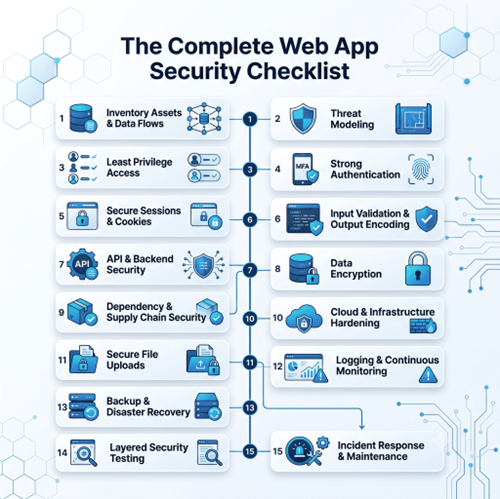
The Complete Web App Security Checklist
The following 15 controls address the most important areas businesses should review before launch and throughout the life of a web application.
1. Inventory Your Assets and Data Flows
You cannot protect data if your team does not know where it is collected, processed, transmitted, and stored.
Create an inventory covering:
- Application domains and subdomains
- Cloud environments and servers
- Databases and storage buckets
- APIs and webhooks
- Third-party integrations
- Administrative interfaces
- Customer and employee data
- Authentication tokens and encryption keys
Document how sensitive information moves between the browser, backend, database, external services, and reporting systems. This process can reveal forgotten endpoints, unnecessary data collection, and integrations that have more access than they need.
Business question to ask
What data would cause the greatest financial, operational, or reputational damage if it were exposed or altered?
2. Perform Threat Modeling Before Development
Threat modeling is the process of identifying potential attackers, attack paths, vulnerable assets, and suitable security controls before software is released.
During planning, examine how someone could misuse account recovery, payment workflows, file uploads, administrative permissions, discount systems, or third-party integrations.
Threat modeling is especially important for SaaS products with multiple organizations or user roles. Review the SaaS Web App Architecture guide to understand how architecture, tenant separation, data design, and scalability decisions affect the product foundation.
3. Design for Least Privilege
Every user, service, API key, and database account should receive only the permissions needed to perform its intended function.
Do not rely on hiding buttons or pages in the interface. Authorization must be enforced on the server for every protected action and resource.
For example, a standard user should not be able to access another customer’s invoice by changing an ID in a URL. A support employee should not automatically receive unrestricted database access. An analytics integration should not be able to modify production records.
Minimum acceptance criteria
Permissions are denied by default, sensitive actions are checked server-side, and administrative capabilities are separated from standard user functions.
Control owner
Engineering and product leadership should define roles together.
Evidence to retain
Maintain a role-permission matrix and test results for every sensitive workflow.
4. Strengthen Authentication
Authentication confirms who a user is. It should be designed to resist credential theft, password attacks, account enumeration, and automated login attempts.
Your authentication controls should include:
- Multi-factor authentication for administrators and sensitive accounts
- Secure password hashing using an established algorithm
- Rate limiting and temporary lockouts
- Secure password-reset links with short expiration periods
- Generic login and recovery messages
- Reauthentication before critical account changes
- Protection against reused or compromised credentials
Whenever possible, use mature authentication libraries or trusted identity providers instead of creating a proprietary authentication system.
5. Secure Sessions and Cookies
After login, the application must protect the user’s session from theft, fixation, and unauthorized reuse.
Use cookies with Secure, HttpOnly, and appropriate SameSite settings. Rotate session identifiers after authentication or privilege changes, expire inactive sessions, and invalidate active sessions when a password is reset.
Applications using cookie-based authentication should also implement cross-site request forgery protection for state-changing requests.
Do not store sensitive authentication tokens in browser locations that are easily accessible to malicious scripts unless the architecture has been specifically designed and reviewed for that approach.
6. Validate Input and Encode Output
Every input should be treated as untrusted, including form fields, query parameters, HTTP headers, uploaded files, API responses, and data retrieved from existing databases.
Validate data on the server using an allow-list approach. Check expected type, format, length, range, and permitted values. Use parameterized database queries rather than combining user input with SQL commands.
Output should be encoded for the context in which it appears, such as HTML, JavaScript, URLs, or database queries. These controls reduce exposure to injection attacks and cross-site scripting.
OWASP recommends performing input validation on a trusted system, validating all untrusted sources, rejecting invalid input, and using contextual output encoding.
7. Protect APIs and Backend Services
Modern web applications depend heavily on APIs, which means API security cannot be treated as a separate concern.
Every endpoint should verify authentication and authorization independently. Apply rate limits to login, search, checkout, messaging, password-reset, and other abuse-prone functions. Restrict cross-origin resource sharing to approved origins rather than using broad wildcard rules.
Additional API controls include:
- Request schema validation
- Object-level authorization
- Endpoint inventory and version management
- Webhook signature verification
- Replay protection
- Response data minimization
- Safe error messages
- API monitoring and anomaly detection
A secure application needs an equally secure server-side foundation. The Apps Developers’ API & Backend Development services cover authentication, role-based access, database architecture, third-party integrations, testing, and scalable API engineering.
8. Encrypt Sensitive Data
All sensitive information should be encrypted in transit using properly configured HTTPS. Sensitive stored data may also require encryption at rest depending on the risk, business requirements, and applicable regulations.
Passwords should be hashed rather than encrypted. Encryption keys, API credentials, database passwords, and signing secrets should be stored in a dedicated secret-management system, not committed to source code or included in public configuration files.
Establish a process for rotating secrets and revoking them quickly if they are exposed.
9. Manage Dependencies and the Software Supply Chain
Most web applications use open-source packages, frameworks, container images, and third-party services. Each component can introduce risk.
Maintain an inventory or software bill of materials showing which components are used and where. Scan dependencies for known vulnerabilities in the development pipeline, remove unused packages, and install security updates based on risk.
Lock dependency versions where appropriate and review package ownership before adoption. A familiar package name alone does not prove that a component is trustworthy.
10. Harden Application and Cloud Configuration
Secure code can still be compromised by weak infrastructure or an unsafe production configuration.
Disable debug mode, sample accounts, unused services, public database access, directory listing, and default credentials. Separate development, testing, and production environments so that test data and experimental services cannot affect live users.
Apply suitable HTTP security headers, including:
- Content-Security-Policy
- Strict-Transport-Security
- X-Content-Type-Options
- Referrer-Policy
- Frame protection through CSP or X-Frame-Options
Infrastructure should be managed through repeatable, reviewed configurations wherever practical. The Apps Developers’ DevOps and Cloud Solutions include CI/CD automation, cloud infrastructure management, monitoring, logging, backups, and reliability planning.
11. Secure File Uploads
File-upload features can expose an application to malware, oversized-file attacks, path traversal, and remote code execution.
Restrict permitted file types and sizes, verify the actual file content instead of trusting the extension, generate new filenames, and store uploads outside executable application directories.
Private documents should require authorization every time they are downloaded. Where the business risk justifies it, scan uploaded files for malware before making them available.
12. Implement Safe Logging and Monitoring
Logs should help the team detect attacks and investigate incidents without creating a second source of sensitive information.
Record significant events such as failed logins, access-control failures, administrative changes, payment anomalies, validation failures, and changes to security settings.
Do not log passwords, complete payment details, session tokens, secret keys, or unnecessary personal data. Protect logs against unauthorized alteration and establish alerts for suspicious activity.
OWASP recommends centralized logging, analysis mechanisms, and records of authentication, access-control, input-validation, and suspected tampering events.
13. Protect Backups and Test Recovery
A backup is valuable only when it is current, protected, and recoverable.
Encrypt backups containing sensitive data, restrict access, define retention periods, and separate critical backups from the primary production environment. Regularly test restoration rather than assuming the process works.
Document recovery-time and recovery-point objectives so business leaders understand how quickly service can be restored and how much data could be lost following an incident.
14. Use Layered Security Testing
No single testing method identifies every vulnerability.
A mature application security program combines:
| Testing method | What it examines | When to use it |
| Secure code review | Application logic and implementation | During development |
| SAST | Source code patterns and potential flaws | In the CI/CD pipeline |
| Software composition analysis | Vulnerable third-party packages | Continuously |
| DAST | A running application from the outside | Testing and staging |
| Penetration testing | Realistic attack paths and business logic | Before major launches and periodically |
| Configuration review | Cloud, server, identity, and network settings | Before release and after infrastructure changes |
The OWASP Web Security Testing Guide provides a comprehensive framework for testing web applications and web services.
Automated scanning is useful, but it should not replace manual testing. Tools often struggle to identify business-logic problems, such as manipulating a transaction sequence, bypassing approval rules, or viewing another customer’s data through a legitimate-looking request.
15. Prepare an Incident Response and Maintenance Plan
Security work continues after launch. New vulnerabilities, dependencies, integrations, and product features can change the risk profile over time.
Your response plan should define:
- Who investigates security alerts
- How affected systems are contained
- How credentials and keys are revoked
- How evidence is preserved
- Who communicates with customers and partners
- How legal or regulatory obligations are assessed
- How lessons are converted into engineering improvements
Set a patching schedule, repeat security testing after major releases, and review the complete web application security checklist at least quarterly.
How to Evaluate a Web Application Development Partner
A development partner should be able to explain how security is included in delivery, not merely say that the application will be “secure.”
Ask prospective partners:
- How are security requirements documented during discovery?
- How are authentication and role-based permissions tested?
- Which code, dependency, and application security tests are used?
- How are secrets and production access controlled?
- What monitoring, patching, and post-launch support are included?
Look for specific answers, defined responsibilities, test evidence, and a secure development process. Vague assurances should not replace verifiable controls.
The Apps Developers provides custom Web Application Development supported by scalable architecture, tested code, secure cloud deployment, and ongoing maintenance. Businesses that need to audit, rebuild, or launch a secure platform can contact The Apps Developers to discuss their application requirements.
Conclusion
A web application is not secure because it passed one scan or launched without an incident. It becomes more resilient when security is built into architecture, coding, infrastructure, testing, monitoring, and maintenance.
Use this web app security checklist as a repeatable business process. Assign an owner to each control, retain evidence of testing, address the highest-risk gaps first, and review the application whenever its technology or business use changes.
Frequently Asked Questions
What is the most important item on a web app security checklist?
The most important requirement is consistent server-side access control. Even strongly authenticated users must only be able to access the records and actions assigned to their roles.
How often should a web application security audit be performed?
A web application security audit should be performed before launch, after major architectural or feature changes, and at regular intervals based on the application’s risk. High-risk or fast-changing applications may require continuous automated testing and more frequent manual reviews.
Is an SSL certificate enough to secure a web application?
No. HTTPS protects information while it travels between systems, but it does not prevent broken access control, injection, insecure file uploads, vulnerable dependencies, weak authentication, or business-logic attacks.
What is the difference between a vulnerability scan and a penetration test?
A vulnerability scan automatically searches for known weaknesses and configuration issues. A penetration test uses skilled human analysis to investigate exploitability, chained vulnerabilities, access-control failures, and business-logic risks.
Should a small business follow the OWASP Top 10?
Yes. The OWASP Top 10 is a practical starting point for businesses of any size because it identifies major categories of web application risk. The controls should then be prioritized according to the application’s data, users, features, and business impact.
Can security be added after a web application is built?
Security controls can be improved after development, but retrofitting them is usually more disruptive and expensive. Authentication, permissions, tenant separation, data storage, and audit logging should be planned during architecture and development whenever possible.