
Running a restaurant means coordinating dozens of moving parts at once: guests waiting for tables, tickets firing to the kitchen, ingredients running low, servers clocking in, and payments closing out at the end of every meal. When each of these runs on a separate tool, data gets lost between systems and managers spend their evenings reconciling spreadsheets instead of improving service.
Restaurant management app development solves this by bringing front-of-house, kitchen, and back-office operations onto one connected platform. Orders placed at the table update inventory, sales flow into reports automatically, and owners can see performance across every shift or branch from a single dashboard.
In this article, we break down the essential features of a restaurant management app, how multi-location platforms are structured, how POS and payment systems integrate, and the step-by-step process of building one. If you are still deciding which type of restaurant app fits your business, our restaurant app development guide covers the broader landscape of app types and use cases.
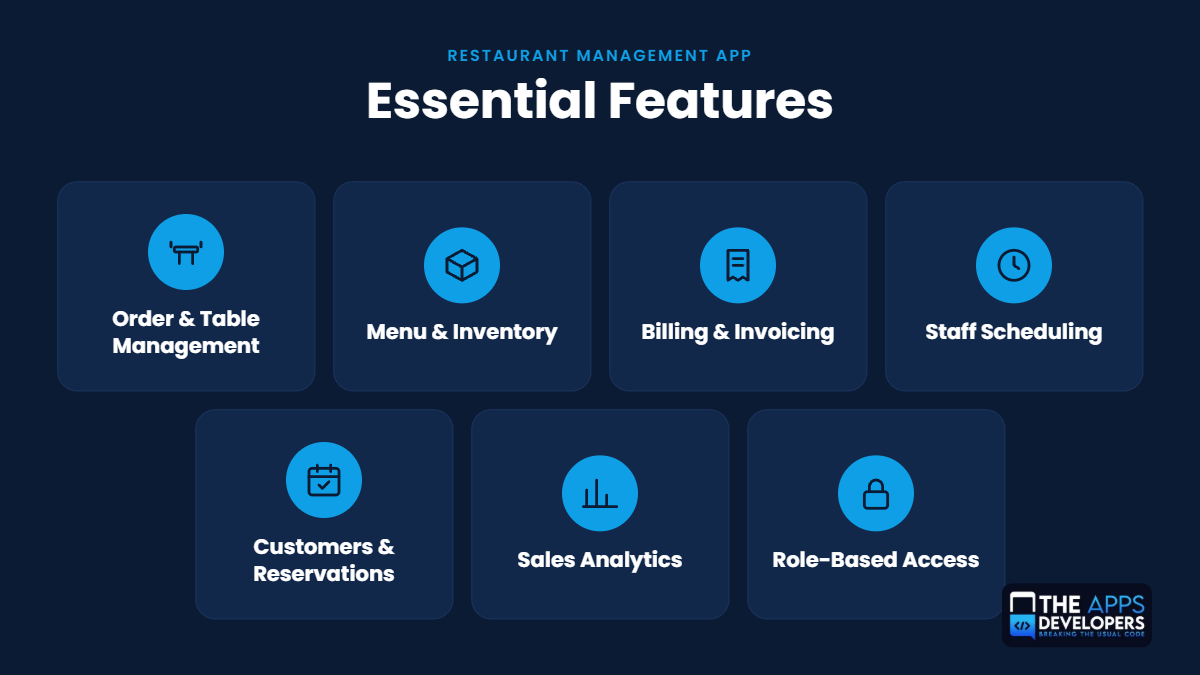
Essential Features of a Restaurant Management App
A restaurant management app is only as useful as the workflows it supports. The features below form the operational core that most full-service, quick-service, and cloud kitchen businesses rely on daily.
Order and Table Management
Order management captures orders from every channel, including dine-in, takeaway, QR code menus, and online delivery platforms, and routes them to the right kitchen station. Integration with a kitchen display system (KDS) replaces paper tickets, tracks preparation times, and flags delayed orders before guests notice.
Table management gives hosts a visual floor plan showing which tables are occupied, reserved, or ready to be cleaned. Features such as table merging, seat-level ordering, course firing, and table transfers help servers manage busy shifts, while turnover data shows how long each table stays occupied.
Menu and Inventory Management
Menu management lets managers add items, modifiers, combos, allergen tags, and time-based menus (breakfast, happy hour, seasonal specials) from a central admin panel. Changes publish instantly to the POS, digital menus, and online ordering channels, which keeps pricing consistent everywhere.
Inventory management connects each menu item to a recipe so that every sale deducts the exact ingredients used. This recipe-level tracking supports par levels, low-stock alerts, supplier purchase orders, waste logging, and food cost percentage calculations, which are critical for protecting margins.
Restaurant Billing and Invoicing
Billing features generate accurate checks from open orders, apply taxes and service charges, and support multiple payment methods. Digital receipts by email or SMS, printed invoices for corporate clients, and catering invoices with deposits are all part of a complete billing module.
Staff Scheduling and Attendance
Scheduling tools let managers build weekly shifts based on forecasted demand, publish rosters to staff mobile devices, and handle shift swaps and time-off requests. Attendance tracking through PIN, biometric, or geofenced mobile clock-in records actual hours worked, calculates overtime, and exports timesheets to payroll systems.
Customer and Reservation Management
A built-in customer relationship management (CRM) module stores guest profiles, visit history, preferences, allergies, and special occasions. Reservation management handles online bookings, waitlists, deposits for large parties, and automated confirmation reminders that reduce no-shows. Loyalty points, digital gift cards, and targeted promotions turn this data into repeat visits.
Sales Reporting and Analytics
Reporting dashboards show real-time sales by hour, day, item, category, server, and channel. Deeper analytics reveal menu engineering insights (which dishes are profitable and popular), labor cost as a percentage of sales, average check size, and peak-hour patterns. These insights help owners adjust pricing, staffing, and purchasing based on data rather than guesswork.
Role-Based Access and Permissions
Role-based access control (RBAC) ensures each user sees only what their job requires. A server can take orders and close checks, a kitchen manager can update inventory, and only the owner or general manager can approve voids, apply large discounts, or view financial reports. Every sensitive action is logged in an audit trail, which helps prevent internal theft and resolve disputes.
How to Build a Multi-Location Restaurant Management Platform
Restaurant groups, franchises, and growing chains need a platform that treats each branch as its own operating unit while keeping control at the head office. This usually calls for a multi-tenant architecture, where all locations share one codebase and database structure, but each branch’s data is logically separated and permission-controlled.
Centralized Dashboard for Multiple Locations
A centralized dashboard gives owners and regional managers a live view of every branch from one screen. They can compare sales, open orders, labor hours, and stock levels across locations, then drill down into any single branch for detail. Alerts for unusual voids, low inventory, or understaffed shifts surface problems without anyone having to call the store.
Branch-Specific Menus, Pricing, and Inventory
Most chains use a master menu controlled by head office, with location-level overrides. A city-center branch may charge higher prices, a beachfront location may add seasonal items, and an airport outlet may run a reduced menu. Inventory is tracked per branch, with support for inter-branch stock transfers and central kitchen or commissary supply orders.
Staff Roles and Location-Based Access
In a multi-location setup, permissions combine role and location. A branch manager can manage staff and reports only for their own restaurant, a regional manager can see a group of branches, and corporate users can access everything. Staff who work at more than one location can be assigned to several branches, with hours and tips tracked separately for each.
Consolidated Sales and Performance Reporting
Consolidated reporting rolls up sales, food cost, labor cost, and profitability across all branches while still allowing location-by-location comparisons. Owners can benchmark top and bottom performers, spot menu items that sell well in one market but not another, and handle multi-currency or multi-tax-region reporting for brands operating in different cities or countries.
Restaurant POS Management System Integration
The point of sale (POS) system is where orders and payments happen, so it is the most important integration in any restaurant platform. A well-connected POS keeps the management app accurate without staff entering the same data twice.
How POS Systems Connect With Restaurant Management Apps
Modern POS platforms such as Toast, Square, Clover, and Lightspeed expose REST APIs and webhooks that external apps can use. The management app pulls data like menus, orders, and transactions through the API, while webhooks push real-time events, such as a new order or a closed check, the moment they happen. For older on-premise POS systems without open APIs, developers may use middleware, database connectors, or scheduled file exports to move data between systems.
Synchronizing Orders, Payments, and Inventory
Two-way synchronization is what makes the integration valuable. Menu and price changes made in the admin panel push to the POS, while orders, payments, refunds, and voids flow back into the management app for reporting. Each sale triggers recipe-level inventory deduction, so stock counts stay current throughout the shift. Good sync logic also handles duplicate events, failed network calls, and conflicting edits so that records stay consistent across systems.
Integrating an Existing POS vs Building a Custom POS
Integrating an existing POS is faster and cheaper when the restaurant already uses hardware it is happy with, the POS has a reliable API, and the business mainly needs better back-office tools. The trade-off is dependence on the vendor’s API limits, transaction fees, and roadmap.
Building a custom POS makes sense when a restaurant group needs workflows no off-the-shelf POS supports, wants to avoid per-terminal licensing fees across many locations, or plans to own its full ordering and payment stack. It requires more upfront investment, payment hardware certification, and stronger security compliance, but gives complete control over features and data.
How Restaurant Billing and Payment Processing Work
Billing and payments sit at the end of every guest experience, so they need to be fast, accurate, and secure. Here is how these modules are typically designed.
Restaurant Billing App Development
A restaurant billing module converts open orders into itemized checks, applies the correct tax rates, service charges, and promotions, and records each transaction against the server, table, and shift. It should support pre-bills, reprints, voids with manager approval, and refunds, along with digital receipts and invoice generation for catering or corporate accounts. Every closed bill feeds directly into sales reports and end-of-day cash reconciliation.
Payment Gateway Integration and Transaction Processing
Payment gateways such as Stripe, Adyen, Square, Braintree, or regional processors handle card authorization and settlement. The app sends a payment request, the gateway communicates with the card network and issuing bank, and an approval or decline returns within seconds. A complete integration supports EMV chip cards, contactless NFC payments, Apple Pay and Google Pay, QR code payments, and pay-at-table devices, plus refunds, pre-authorizations for bar tabs, and daily settlement reports.
Split Bills, Tips, Discounts, and Tax Calculations
Group dining makes flexible billing essential. The app should split checks evenly, by seat, or by item, and accept multiple payment methods on a single bill. Tip handling includes suggested tip percentages, tips on card or cash, tip pooling, and distribution reports for payroll. Discounts and promo codes need clear rules and approval limits, while tax logic must handle inclusive or exclusive pricing, different rates for dine-in and takeaway, and location-specific tax rules for multi-branch businesses.
Payment Security and PCI DSS Considerations
Any app that processes, stores, or transmits cardholder data must comply with the Payment Card Industry Data Security Standard (PCI DSS). The safest approach is to keep raw card data out of your system entirely by using gateway-hosted payment fields, tokenization, and point-to-point encryption (P2PE) on card readers. This greatly reduces your PCI scope. Additional safeguards include TLS encryption in transit, encrypted databases, role-based access, multi-factor authentication for admins, and regular security audits.
How to Develop a Restaurant Management App Step by Step
A structured development process reduces rework, keeps budgets predictable, and ensures the final product fits how your restaurant actually operates. These are the seven stages our team follows.
Step 1 — Define Restaurant Operations and Requirements
Start by mapping how your restaurant runs today: how orders move from table to kitchen, how inventory is counted, how shifts are scheduled, and where staff lose the most time. Interviews with owners, managers, servers, and kitchen staff reveal pain points that should shape the requirements. The output is a clear scope document listing workflows, integrations, compliance needs, and success metrics.
Step 2 — Identify MVP Features and User Roles
Not every feature needs to launch on day one. A minimum viable product (MVP) usually covers ordering, table management, menu setup, billing, payments, and basic reports. Advanced modules such as loyalty programs, AI-based demand forecasting, or supplier portals can follow in later releases. This stage also defines user roles (owner, manager, server, cashier, chef, and guest) and what each one can see and do.
Step 3 — Design the App Interface and Admin Dashboard
Restaurant staff work fast, often with one hand, under pressure. UI/UX design should prioritize large touch targets, minimal taps per order, clear status colors, and layouts optimized for tablets and handheld POS devices. The admin dashboard needs a different approach: clean data visualization, easy menu editing, and quick access to reports. Wireframes and clickable prototypes are tested with real staff before development begins.
Step 4 — Choose the Technology Stack and Architecture
Typical choices include React Native or Flutter for cross-platform mobile and tablet apps, React or Angular for the web admin panel, and Node.js, Python (Django), or Laravel for the backend. PostgreSQL or MySQL handle transactional data, Redis supports caching and real-time updates, and cloud platforms like AWS, Google Cloud, or Azure provide scalable hosting. The architecture should support real-time communication through WebSockets, offline-first local storage, and a multi-tenant design if multiple locations are planned.
Step 5 — Develop the Frontend and Backend
Development runs in agile sprints, usually two weeks each, with working features demonstrated at the end of every sprint. Backend developers build APIs, business logic, database structures, and user authentication. Frontend developers build the staff app, kitchen display screens, admin dashboard, and any guest-facing ordering interface, connecting each one to the APIs.
Step 6 — Integrate POS, Payments, and Third-Party Systems
This stage connects the app to the wider restaurant ecosystem. Common integrations include POS systems, payment gateways, delivery platforms (Uber Eats, DoorDash, Deliveroo), accounting software (QuickBooks, Xero), payroll tools, reservation platforms, SMS and email services, and receipt printers or cash drawers. Each integration is tested for error handling, retries, and data accuracy.
Step 7 — Test, Deploy, and Maintain the Application
Quality assurance covers functional testing, peak-hour load testing, payment testing in sandbox environments, security testing, and offline scenario testing. A pilot launch at one location lets staff use the system during real service before a full rollout. After deployment, ongoing maintenance includes bug fixes, OS and device updates, security patches, performance monitoring, and new feature releases based on user feedback.
Custom Restaurant Management App vs Ready-Made Software
Ready-made restaurant software is quick to set up and works well for small, single-location restaurants with standard workflows. A custom app is the better fit when your operations, integrations, or growth plans go beyond what a subscription product can handle.
| Factor | Custom Restaurant Management App | Ready-Made Software |
| Customization and operational flexibility | Built around your exact workflows, menu logic, and service style | Limited to the vendor’s features and settings |
| Integration with existing restaurant systems | Connects to any POS, ERP, accounting, or delivery platform you use | Restricted to the vendor’s supported integrations |
| Multi-location scalability | Designed for your branch structure, regions, and franchise model | Often priced per location, with limited central control |
| Ownership, maintenance, and long-term costs | You own the code and data; higher upfront cost, no recurring license fees | Lower upfront cost; ongoing subscription and per-terminal fees that grow with scale |
Customization and operational flexibility: Off-the-shelf tools force your team to adapt to the software. A custom solution adapts to you, whether that means a unique kitchen routing flow, a hybrid dine-in and cloud kitchen model, or custom loyalty rules.
Integration with existing restaurant systems: Many restaurants already use a POS, accounting tool, and delivery partners they do not want to replace. Custom development connects these systems directly instead of relying on a vendor’s marketplace.
Multi-location scalability: Chains and franchises need central menu control, branch-level permissions, and consolidated reporting. Custom platforms are built to scale with new locations without multiplying subscription costs.
Ownership, maintenance, and long-term costs: Ready-made software looks cheaper at first, but subscription and transaction fees add up over years and across branches. With a custom app, you own the product and its data, and maintenance costs stay predictable.
What Affects Restaurant Management App Development Cost?
The budget for restaurant management app development depends on the scope of the platform and how many systems it needs to connect with. The main cost drivers are:
- Number and complexity of features: A basic ordering and billing app costs far less than a platform with inventory recipes, CRM, loyalty, and advanced analytics.
- Single-location vs multi-location development: Multi-tenant architecture, branch-level permissions, and consolidated reporting add design and development effort.
- Mobile and web platform requirements: Supporting iOS, Android, tablets, kitchen displays, and a web admin panel increases the scope compared to a single platform.
- POS and payment integrations: Each POS, payment gateway, and delivery platform integration adds development and testing time, especially for legacy systems.
- Ongoing maintenance: Hosting, security updates, device compatibility, and feature improvements are recurring costs to plan for after launch.
For detailed price ranges, timelines, and a feature-by-feature breakdown, read our guide on restaurant app development cost.
Planning Your Restaurant Management App?
Building a restaurant management app involves choosing the right features, integrations, and architecture for your operations. If you’re exploring a custom solution, our restaurant app development services in the USA can help you understand the development options available for your business.
Related Insights
Explore these guides to learn more about restaurant app development, features, and budgeting.
- Restaurant Reservation App Development
- White-Label vs Custom Restaurant App Development: Which Is Better?
- Restaurant Loyalty App Development