
Yes, you can patent a mobile app in the US, but only the parts that are a new, non-obvious technical invention, not the app idea itself. A unique process, a novel way your software improves how a device works, or an original interface design can qualify, while a general concept like “an app for booking dog walkers” cannot.
Every founder hits this question eventually, usually right after a friend says, “You should patent that before someone steals it.” It’s a fair worry. You’ve spent months on an idea, and the thought of a bigger company copying it overnight is enough to keep anyone up at night.
The honest answer is more nuanced than yes or no. A patent for a mobile application is possible, but it’s expensive, slow, and not always the best way to protect what you’ve built. In this guide, we explain what makes an app patentable, the types of app patents, the filing process, real USPTO fees, and the other forms of intellectual property that often protect mobile applications better. We see these questions constantly in our Mobile App Development work, so we’ll keep it practical.
This article is general information, not legal advice. Talk to a registered patent attorney or agent about your specific app.
What Is an App Patent?
An app patent is a legal right granted by the United States Patent and Trademark Office (USPTO) that stops others from making, using, or selling a specific invention within your app for a set period.
A patent doesn’t protect your app as a whole, and it doesn’t protect an idea. It protects a clearly defined invention, described in the patent’s claims. If your app contains a genuinely new technical method, a patent can stop competitors from copying that method, even if they write completely different code.
Can You Patent an App Idea?
No. You can’t patent an app idea on its own. Patents protect specific, working inventions, not concepts, business models, or goals.
“An app like Uber for pet grooming” is an idea. The specific system that matches groomers to pets using a new routing method could be an invention. Ideas are free for anyone to build, which is why the apps that win usually win on execution, as our breakdown of how to build an app like Uber shows.
What Makes a Mobile App Patentable?
To qualify for a patent, the invention inside your app has to meet four requirements under US patent law.
| Requirement | What It Means | App Example |
| Patent-eligible subject matter | It’s a real process or system, not an abstract idea | A new data compression method that speeds up video upload |
| Novelty | Nothing identical exists in prior art | No earlier app, paper, or patent describes it |
| Non-obviousness | An expert wouldn’t see it as an obvious next step | Not just combining two common features |
| Utility | It works and serves a real purpose | The method runs and delivers a measurable result |
The Abstract Idea Test
Software patents face one big hurdle: the abstract idea rule. In Alice Corp. v. CLS Bank, the Supreme Court held that taking an abstract idea and simply running it on a generic computer isn’t enough to earn a patent. You can read the Alice decision for the full reasoning.
Since then, patent examiners use a two-step test. First, is the claim directed to an abstract idea, such as organizing information, a mental process, or a business method? If yes, does it add something more, like a specific technical improvement to how the computer or device works? The USPTO explains this test in detail in MPEP 2106 on patent subject matter eligibility.
In plain terms, an app that improves technology, like faster processing, better battery use, or a new way of handling data, has a much better chance than an app that just digitizes a familiar business process.
Types of Patents for Mobile Apps
Mobile apps can be protected by utility patents, which cover how the app works, and design patents, which cover how parts of the app look.
| Patent Type | What It Protects | Term | Best For |
| Utility patent | Functional methods, systems, and processes | 20 years from filing | Technical innovations in how the app works |
| Design patent | Ornamental design, such as icons and screen layouts | 15 years from grant | Unique visual interface elements |
| Provisional application | Holds a filing date for 12 months (not a patent) | 12 months, no extension | Early-stage startups testing the market |
Utility Patents
Utility patents are the main type of app patents. They protect what your software does and how it does it, such as a new algorithm for processing sensor data or a novel way of syncing information across devices.
Design Patents
Design patents protect the ornamental look of specific interface elements, like an original icon or an animated screen transition. A distinctive interface is often the product of careful UI/UX design, and in some cases that visual work can be protected with a design patent.
Provisional Patent Applications
A provisional application isn’t a patent, and it’s never examined. It holds your filing date for 12 months and lets you say “patent pending” while you test the market or raise money. The USPTO explains the rules on its provisional application page. If you don’t file a full application within those 12 months, you lose that early date.
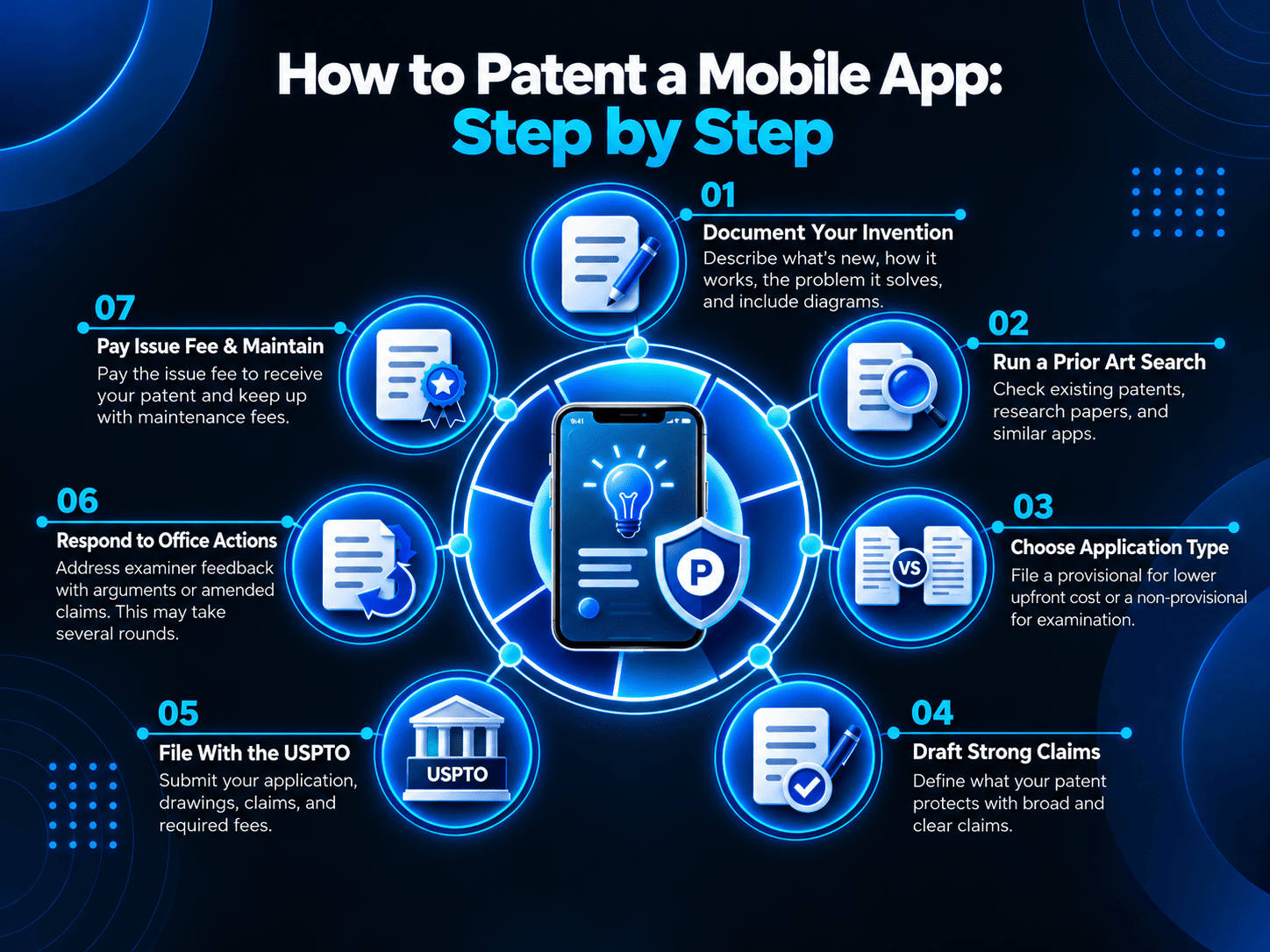
How to Patent a Mobile App: Step by Step
Step 1: Document Your Invention
Write down exactly what’s new in your app, how it works technically, and what problem it solves. Include flowcharts, diagrams, and the dates you developed each part.
Step 2: Run a Prior Art Search
Search existing patents, published applications, research papers, and existing apps to see if your invention already exists. A professional search costs money but can save you from filing an application that will be rejected.
Step 3: Decide on a Provisional or Non-Provisional Application
File a provisional application if you need time and a lower upfront cost. File a non-provisional application if your invention is ready and you want examination to start.
Step 4: Draft Strong Claims
The claims define exactly what your patent protects. They need to be broad enough to stop competitors but specific enough to show a technical improvement. This is where an experienced patent attorney adds the most value.
Step 5: File With the USPTO
Submit your application through the USPTO’s Patent Center, along with drawings, a detailed description, your claims, and the required fees.
Step 6: Respond to Office Actions
An examiner will review your application and often reject some claims at first. You’ll respond with arguments or amended claims, and this back-and-forth can take several rounds.
Step 7: Pay the Issue Fee and Maintain the Patent
If your application is allowed, you pay an issue fee to receive the patent. Utility patents also require maintenance fees at set intervals to stay in force.
How Much Does It Cost to Patent a Mobile App?
USPTO fees for an app patent start at $65 for a micro entity provisional application, but most of the total cost comes from attorney fees for drafting and prosecuting the full application.
According to the USPTO fee schedule, current filing fees are:
| Fee | Large Entity | Small Entity | Micro Entity |
| Provisional application filing fee | $325 | $130 | $65 |
| Non-provisional utility basic filing fee | $350 | $140 | $70 |
| Utility search fee | $770 | $308 | $154 |
| Utility examination fee | $880 | $352 | $176 |
Small entity status generally covers independent inventors and businesses with 500 or fewer employees, and micro entity status has stricter income and filing limits. On top of these government fees, attorney drafting for a full software patent application often runs into five figures, plus later costs for office action responses, the issue fee, and maintenance fees. Always check the current fee schedule before filing, because fees change.
How Long Does It Take to Get an App Patent?
Getting a utility patent usually takes two years or more from filing, depending on the technology area and how many rounds of review your application needs. Apps move fast, so some features may change before the patent is granted. That’s one reason many startups file a provisional application early and decide later whether a full patent is worth it.
Other Ways to Protect Intellectual Property in Mobile Applications
Patents are only one part of intellectual property for mobile applications. Copyright, trademarks, and trade secrets often protect apps faster and at lower cost.
| Protection | What It Covers | How You Get It | Cost |
| Copyright | Source code, text, graphics, and other original content | Automatic when created; registration adds legal advantages | Low |
| Trademark | App name, logo, and brand identity | Use in commerce; USPTO registration is stronger | Low to moderate |
| Trade secret | Backend algorithms, data models, and know-how kept confidential | Confidentiality measures and NDAs | Low |
| Patent | New, non-obvious technical inventions | USPTO application and examination | High |
Copyright
Your code and original visual content are protected by copyright automatically. Registering with the US Copyright Office isn’t required for protection, but it’s generally needed before you can sue for infringement in the US.
Trademarks
Your app’s name and logo are often your most valuable assets, because users find and trust you by name. Registering a trademark early helps stop copycats from using a confusingly similar name in app stores.
Trade Secrets
Much of what makes an app valuable runs on the server, out of sight. Keeping recommendation engines, pricing logic, or data models on a protected backend, built with secure API and backend development, lets you guard them as trade secrets instead of disclosing them in a public patent.
Open-Source Licenses
If your app uses open-source components, their licenses can affect what you own and what you must share. Our guide to open source web application development covers how to choose and use these components safely.
Contracts and IP Ownership
When you hire developers, your contract should clearly assign ownership of the code and any inventions to your company. This matters just as much as any patent, especially for larger organizations, and our enterprise mobile app development guide covers how to structure these agreements with technology partners.
Common App Patent Mistakes to Avoid
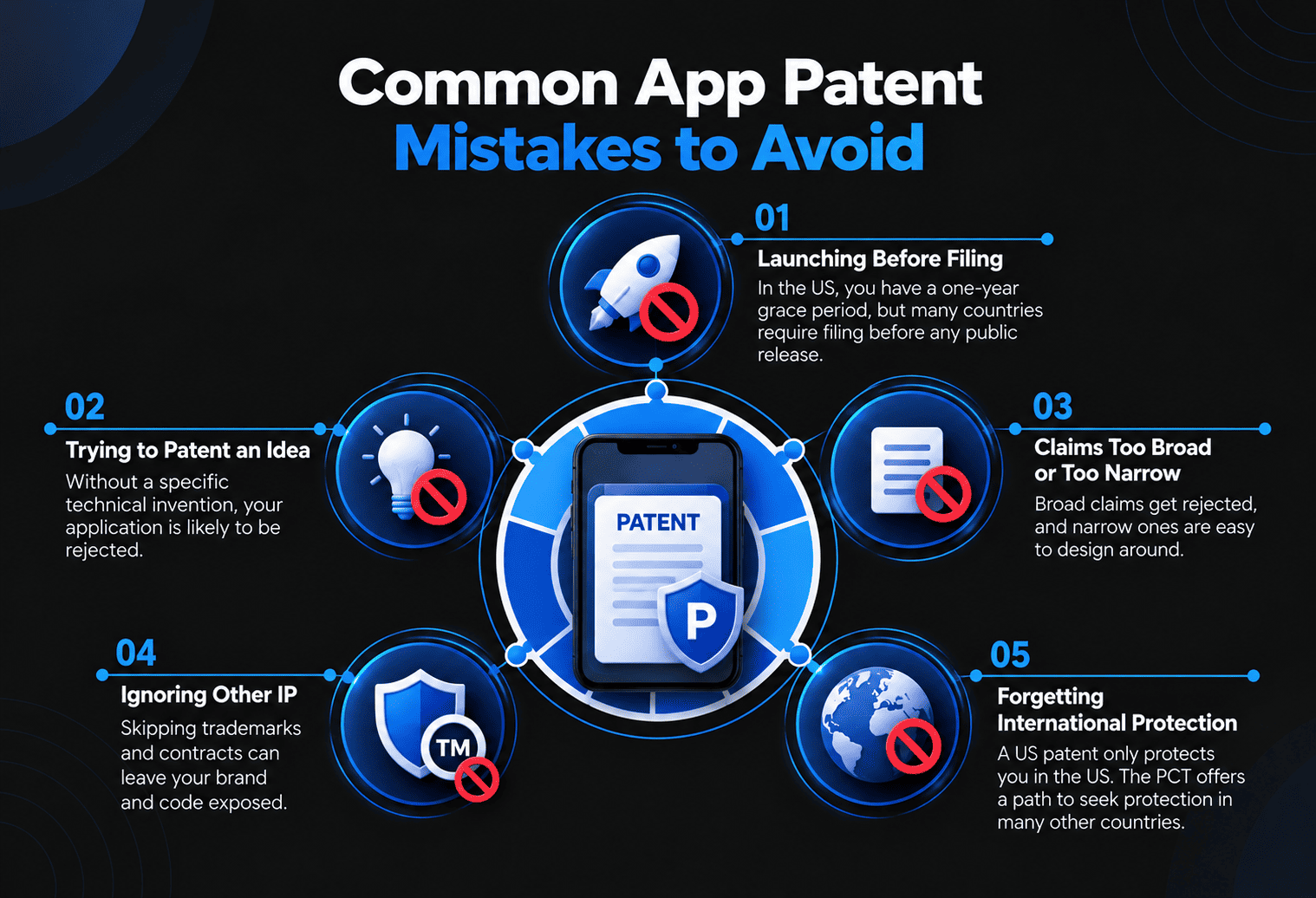
- Launching before filing. In the US, you generally have a one-year grace period after your own public disclosure, but many other countries require filing before any public release.
- Trying to patent an idea. Without a specific technical invention, your application is likely to be rejected.
- Writing claims that are too broad or too narrow. Broad claims get rejected, and narrow ones are easy to design around.
- Ignoring other IP. Skipping trademarks and contracts can leave your brand and code exposed.
- Forgetting international protection. A US patent only protects you in the US. The Patent Cooperation Treaty (PCT) offers a path to seek protection in many other countries.
Is Patenting Your App Worth It?
A patent for a mobile application makes the most sense when it contains a genuine technical breakthrough, you plan to raise significant funding, or you expect larger competitors to copy your core technology. It’s harder to justify if your app’s value comes from its brand, user experience, or business model, since those are better protected by trademarks, copyright, and fast execution.
For many startups, the smartest sequence is to protect the brand with a trademark, secure code ownership through contracts, keep backend logic as a trade secret, and file a provisional application only for features that are truly new.
Conclusion
You can patent a mobile app, but only the parts that are truly new technical inventions. For most founders, the best protection combines several tools: trademarks for the brand, copyright and clear contracts for the code, trade secrets for backend logic, and patents for genuine breakthroughs. Get advice from a patent professional early, and keep building, because execution is still the strongest moat.
Planning an app with innovative technology you want to protect? Book a free consultation with The Apps Developers, and we’ll help you build it with clear code ownership and a backend designed to keep your secret sauce secure.
Frequently Asked Questions
Can I patent my mobile app?
Yes, if your app includes a new, non-obvious technical invention. You can’t patent the general app idea, but you can patent specific processes, systems, or original interface designs within the app.
Can you patent an app idea?
No. Patent law doesn’t protect ideas on their own. You need a specific, working invention with a clear technical solution before you can file for a patent.
How much does it cost to patent an app?
USPTO filing fees start at $65 for a micro entity provisional application. A full utility patent costs much more once attorney drafting and prosecution are included, often reaching five figures.
How long does an app patent last?
A utility patent lasts 20 years from its filing date, as long as maintenance fees are paid. A design patent lasts 15 years from the date it’s granted.
What is the difference between a patent and copyright for apps?
A patent protects a technical invention, such as how your app performs a task. Copyright protects your actual code and original content automatically, but it doesn’t stop someone from building the same feature with different code.
Do I need a patent before launching my app?
No. Most apps launch without patents. If you think you have a patentable invention, talk to a patent attorney before launching, because public release can affect your rights, especially outside the US.