

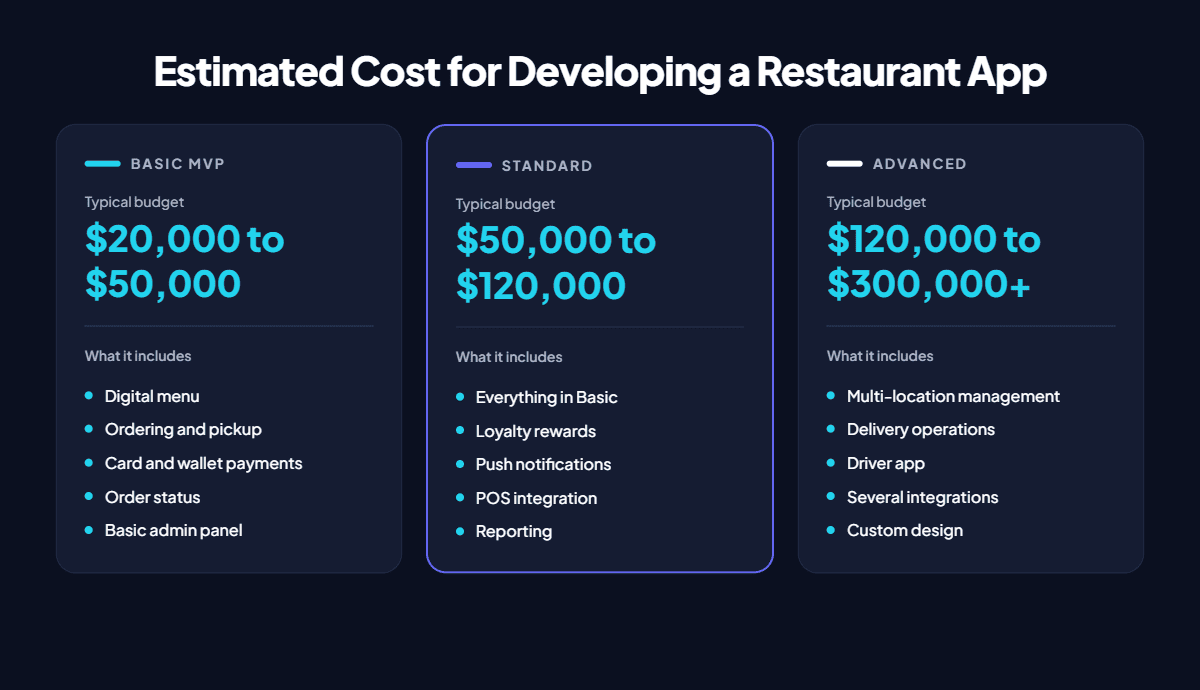
A custom restaurant app typically costs $20,000 to $50,000 for a basic ordering app, $50,000 to $120,000 for a standard app with loyalty and POS integration, and $120,000 to $300,000 or more for multi-location or delivery platforms. The final price depends on features, integrations, platforms, and who builds it.
Those ranges are wide because “restaurant app” covers very different products. A pickup ordering app for one location and a delivery platform for twenty locations share a name, not a budget. This article shows what each budget buys, which features move the price most, what you keep paying after launch, and how to tell whether a custom build makes sense before you request a quote for restaurant app development.
How Much Does Restaurant App Development Cost in 2026?
Restaurant app development cost falls into three tiers based on complexity. Each tier below assumes one cross-platform app for iOS and Android, a backend, an admin panel, testing, and app store launch, built by a US-market development team.
These figures are planning estimates, not quotes. Published estimates vary widely across agencies, mostly because they assume different features and team rates. All three tiers exclude ongoing costs, such as hosting, maintenance, and payment processing, covered later in this article.
How Much Does Each Type of Restaurant App Cost?
The type of restaurant app sets the baseline cost, because each type needs a different set of screens, user roles, and backend logic. The estimates below assume one cross-platform app with a backend and admin panel.
- Online ordering app: $25,000 to $60,000. Menu, cart, checkout, pickup or delivery selection, payments, and order status. Menu modifiers, combos, and tax rules drive most of the effort.
- Reservation app: $20,000 to $50,000. Table availability, bookings, cancellations, waitlists, and a staff view for seating. Seating rules and party-size logic add complexity.
- Loyalty app: $20,000 to $45,000. Guest profiles, points, tiers, and reward redemption. The cost rises when rewards must work both in the app and at the in-store POS.
- Delivery app with your own drivers: $60,000 to $150,000. Adds a driver app, dispatch logic, live GPS tracking, and proof of delivery on top of ordering.
- Multi-location restaurant app: $70,000 to $180,000. Each location needs its own menu availability, prices, taxes, hours, and kitchen routing, plus central reporting and staff permissions.
- Multi-vendor restaurant marketplace: $120,000 to $300,000+. Many restaurants on one platform, with restaurant onboarding, commission handling, payouts, a driver network, and three or more apps.
These types overlap, so their prices do not add up. Most restaurants combine ordering and loyalty in one app, and that combination usually lands in the standard tier.
How Much Do Restaurant App Features Add to the Cost?
Features change the cost by the amount of logic, testing, and integration they require. The table shows the typical added cost of each feature on top of a basic ordering app. These are incremental estimates, not prices for standalone apps.
| Feature | Typical Added Cost | What Changes the Effort |
| Advanced menu and ordering | $3,000 to $10,000 | Item modifiers, combos, scheduled orders, item availability by time of day |
| Payment options | $2,000 to $6,000 | Tips, refunds, Apple Pay and Google Pay, saved cards, gift cards |
| Table reservations | $8,000 to $20,000 | Seating rules, party sizes, cancellations, waitlists |
| Loyalty and rewards | $6,000 to $18,000 | Points rules, tiers, redemption, rewards shared with in-store purchases |
| POS integration | $8,000 to $30,000 per POS | One-way order sending vs. two-way menu and order sync |
| Delivery through a third-party API | $5,000 to $12,000 | Driver requests, delivery quotes, status updates |
| Custom driver app and live tracking | $25,000 to $60,000 | Separate driver app, dispatch rules, GPS tracking, proof of delivery |
| Advanced admin dashboard | $5,000 to $15,000 | Staff roles, permissions, sales reports, promotion tools |
| Multi-location management | $10,000 to $30,000 | Menus, prices, taxes, and hours per location, plus central reporting |
Why Does POS Integration Cost So Much?
The point-of-sale (POS) system is the restaurant’s central record of menu items, prices, and orders. POS integration has the widest cost range because two levels exist:
- One-way integration sends app orders into the POS. It is the simpler and cheaper option.
- Two-way integration also pulls menu changes, prices, and sold-out items from the POS into the app. It needs more engineering, more testing, and careful handling of modifiers and taxes.
POS providers such as Toast, Square, and Clover each structure menu data differently. Some also require partner approval before developers receive API access, which can add weeks to the schedule. A second POS adds a second integration budget.
What Factors Affect Restaurant App Development Cost?
Five factors decide most of a restaurant app’s cost: functionality, platforms, integrations, user roles and locations, and team rates. Two quotes for the “same” app usually differ because they make different assumptions about these five factors.
Functionality and Complexity
An MVP, or minimum viable product, is the smallest version of the app that guests can use to order and pay. It costs far less than a fully custom product with loyalty tiers, scheduled catering, and personalized offers. Every added feature brings design, development, and testing work.
Platforms
Cross-platform development builds one app for iOS and Android with frameworks such as Flutter or React Native. Native development builds two separate apps, in Swift for iOS and Kotlin for Android, and costs roughly 30% to 60% more for the same features. A web ordering site or progressive web app (PWA) costs less than a mobile app but offers weaker push notifications and no App Store listing.
Third-Party Integrations
Each integration connects the app to an outside system: POS, payment gateway, delivery service, CRM, or loyalty platform. Integrations cost more than they look because developers must handle the other system’s rules, errors, and outages. A well-documented payment API takes days. A two-way POS sync can take weeks.
User Roles and Locations
A user role is a type of person with its own screens and permissions, such as guest, manager, kitchen staff, or driver. Each role adds screens and testing. Each location adds menu, price, tax, and hours settings that the app must handle correctly.
Development Team Location and Rates
Hourly rates for experienced app developers typically run $100 to $200 in the US, $40 to $80 in Eastern Europe and Latin America, and $25 to $50 in South Asia. Lower rates reduce the budget, but time zone gaps, communication, and restaurant-domain experience affect how many hours the project actually takes.
Where Does the Money Go During Restaurant App Development?
Most of a restaurant app budget goes to building the apps, the backend, and the integrations. Planning, design, and testing take a smaller but essential share.
Here is an illustrative breakdown of a $60,000 project: a single-location ordering app for iOS and Android with pickup, payments, basic loyalty, an admin panel, and one-way POS integration.
- Discovery and planning: $4,000. Requirements, feature list, POS and payment review, and a written project scope.
- UI/UX design: $8,000. Ordering flow, wireframes, clickable prototype, and final screen designs.
- Mobile app development: $16,000. The guest-facing iOS and Android app from one cross-platform codebase.
- Backend and admin panel: $14,000. Order processing, menu management, loyalty logic, and the manager dashboard.
- Integrations: $9,000. POS, payment gateway, and push notification setup.
- Testing and QA: $6,000. Device testing, payment testing, and load testing for peak hours.
- Deployment and launch: $3,000. Server setup, App Store and Google Play submission, and launch support.
The split shifts with scope. A two-way POS sync moves more budget into integrations, while a heavily branded design moves more into UI/UX. Ask any development company for a similar breakdown with its quote, so you can see exactly what each part costs. The restaurant app development guide explains what happens in each of these stages, from discovery to launch.
What Are the Hidden and Ongoing Costs of a Restaurant App?
A restaurant app keeps costing money after launch. Plan for fixed costs, transaction costs, and optional new features, because the total cost of ownership is always higher than the build price.
Fixed Costs
- Maintenance and updates: commonly budgeted at 15% to 20% of the build cost per year. This covers bug fixes, security patches, and updates for new iOS and Android versions. The figure is a planning rule of thumb, not a fixed fee.
- Cloud hosting: often $100 to $1,000 or more per month, depending on order volume and the number of locations.
- App store accounts: $99 per year for the Apple Developer Program and a one-time $25 fee for Google Play.
- Third-party subscriptions: some POS providers, loyalty platforms, and analytics tools charge monthly fees for API or partner access.
Transaction Costs
- Payment processing: card processors charge a fee on every order. Stripe’s standard US rate, for example, is 2.9% plus 30 cents per online card payment.
- Delivery fees: delivery APIs charge per delivery when a third-party driver handles the order.
- SMS and notifications: text message order updates and verification codes cost a small fee per message.
Costs Restaurants Often Forget
Promoting the app costs money too. Table signs, packaging inserts, and first-order discounts all drive downloads, and an app nobody installs never pays back its build cost. New features after launch, such as catering or a second POS, are separate projects with their own budgets.
How Can You Reduce Restaurant App Development Costs?
The safest way to reduce restaurant app development cost is to build less at first, not to build cheaper. Cuts to testing, security, or integration quality usually cost more to fix later than they save.
- Start with an MVP. Launch ordering, payments, and order status first. Add loyalty, reservations, or catering after real orders show what guests use.
- Choose cross-platform development. One Flutter or React Native codebase serves iOS and Android. It suits most restaurant apps, which rarely need native-only device features.
- Limit integrations in the first release. Start with one-way POS integration and one payment gateway. Move to two-way menu sync once the core ordering flow is stable.
- Use existing services. Delivery APIs, payment gateways, and notification services cost far less than building custom driver networks or messaging systems.
- Prepare content early. Final menus, prices, modifiers, photos, and brand assets ready before development prevents paid delays.
- Release in phases. Phased releases spread cost over time and let order data guide each next investment.
One saving to treat carefully is choosing a team purely on hourly rate. A lower rate with no restaurant or POS experience often means more hours, more rework, and a later launch.
Is Building a Custom Restaurant App Worth the Investment?
A custom restaurant app is worth the investment when it moves enough repeat orders away from commission-based marketplaces to cover its build and running costs. Restaurants with loyal regulars and steady order volume reach that point fastest.
Marketplace commissions set the baseline. DoorDash, for example, charges US restaurants 15% to 30% per delivery order depending on the plan, according to its published merchant pricing. On a $35 order, that is $5.25 to $10.50 per order.
A Simple Payback Example
This illustrative example uses conservative assumptions:
- Build cost: $60,000 for a standard ordering and loyalty app.
- Orders moved to the app: 1,000 per month from regular guests who previously ordered through a marketplace.
- Net saving per order: $5 after payment processing and delivery costs.
- Annual savings: 1,000 orders × $5 × 12 months = $60,000.
- Annual running cost: $15,000 for maintenance, hosting, and services.
- Net annual benefit: $60,000 − $15,000 = $45,000.
- Payback period: $60,000 ÷ $45,000 = about 16 months.
The example leaves out marketing costs, slower adoption in the first months, and guests who keep using marketplaces. Your own numbers will differ, so run them with your real order volume and commission rates.
When a Custom App Does Not Pay Off
A branded app does not create demand by itself. A restaurant with mostly first-time guests, low order volume, or no plan to promote the app will struggle to recover a custom build. In that case, an online ordering website or a white-label app is the better first step.
Get a Restaurant App Development Cost Estimate
The right budget comes from your restaurant’s own scope: locations, platforms, features, and the POS you run. Share those details with our team through the contact page, and we will help you scope the first release and estimate a realistic development budget.