
Monitoring tells you when something is wrong by tracking predefined metrics and firing alerts. Observability lets you figure out why it’s wrong, even for problems nobody predicted, by exploring rich telemetry such as logs, metrics, and traces. Put simply, monitoring is something you do, while observability is a quality your system has. You need both, and good monitoring depends on an observable system.
It’s 2 a.m. and the alert fires: checkout latency is up. The dashboard confirms it, a red line climbing steadily. Everyone on the call can see that something is broken. Nobody can see why. Is it the database? A new release? One payment provider? A single region? Forty minutes later, someone finally spots it by digging through logs on three different servers.
That gap, between knowing something is wrong and understanding why, is the real difference between monitoring and observability. People use the two words as if they mean the same thing, but they don’t, and mixing them up leads teams to buy the wrong tools and still struggle during incidents. In this guide, we’ll explain both clearly, walk through a real example, and show you how to build observability into your systems. It’s a big part of how our DevOps and cloud solutions team keeps client products reliable.
Observability vs Monitoring at a Glance
| Factor | Monitoring | Observability |
| Main question | Is something wrong? | Why is it wrong? |
| Type of problems | Known problems you planned for | Known and unknown problems |
| How it works | Predefined metrics, thresholds, and alerts | Exploring rich, correlated telemetry |
| Typical output | Dashboards and alerts | Answers to new questions during investigation |
| Nature | An activity you perform | A property of the system |
| Data | Mostly aggregated metrics and health checks | Logs, metrics, traces, events, and profiles with context |
| Best for | Stable, simpler systems | Distributed, cloud-native, fast-changing systems |
What Is Monitoring?
Monitoring is the practice of collecting predefined metrics and health checks from your systems, displaying them on dashboards, and alerting your team when values cross set thresholds.
Monitoring answers questions you already know to ask. Is the server up? Is the CPU above 90%? Are error rates higher than usual? It’s essential, and every production system needs it.
What Good Monitoring Tracks
Google’s Site Reliability Engineering book describes four golden signals that every user-facing system should watch:
- Latency: how long requests take.
- Traffic: how much demand the system is handling.
- Errors: how many requests fail.
- Saturation: how “full” your resources are, such as CPU, memory, or connections.
Two other popular frameworks help too. The RED method (rate, errors, duration) suits request-driven services. Brendan Gregg’s USE method (utilization, saturation, errors) suits infrastructure resources like disks and CPUs.
Where Monitoring Falls Short
Monitoring only covers what you thought to measure in advance. If a problem shows up in a way you didn’t predict, your dashboards stay green while users suffer, or they turn red without telling you why.
What Is Observability?
Observability is the ability to understand what’s happening inside a system by examining the data it produces, so you can answer new questions about its behavior without shipping new code.
The term comes from control theory, where engineer Rudolf Kálmán described a system as observable if you could work out its internal state from its external outputs. In software, it means your applications emit enough detailed, connected data that you can investigate any strange behavior, not just the failures you planned for.
A helpful way to think about it: monitoring handles known unknowns, problems you expect might happen. Observability helps with unknown unknowns, problems you never imagined.
The Telemetry Behind Observability
Observability depends on telemetry, the data your systems emit. You’ll often hear about the “three pillars,” but modern observability uses a few more signals.
| Signal | What It Is | What It Helps You Answer |
| Metrics | Numbers measured over time, like request count or memory use | How much, how often, and what’s trending? |
| Logs | Timestamped records of events, ideally structured | What exactly happened at this moment? |
| Traces | The path of one request across services | Where did this request spend its time or fail? |
| Events | Records of meaningful changes, like deploys or config updates | What changed right before the problem? |
| Profiles | Snapshots of where code spends CPU and memory | Which function is slow or wasteful? |
The real power comes from connecting these signals. When a log line carries the same trace ID as the request that produced it, you can jump from an alert to the exact trace to the exact log in seconds.
That’s why OpenTelemetry has become the industry standard. It’s an open-source, vendor-neutral framework from the Cloud Native Computing Foundation for collecting metrics, logs, and traces in a consistent way, so you aren’t locked into one tool.
One Incident, Two Approaches: A Real-World Example
Let’s go back to that 2 a.m. checkout slowdown and see how each approach handles it.
With monitoring only: An alert fires because average checkout latency crossed 2 seconds. The dashboard shows the spike started at 1:47 a.m. CPU and memory look normal. The team starts guessing, checks recent deployments, restarts a service, and searches logs on individual servers. It takes 40 minutes to find the cause.
With observability: The same alert fires, but now the engineer opens a trace for one slow checkout. It shows the request spent 1.8 seconds waiting on one payment provider’s API. Filtering all slow traces by attributes reveals that only customers using the latest mobile app version, in one region, routed to that provider are affected. A deploy event at 1:45 a.m. shows a new retry setting went live. The team rolls it back in under 10 minutes.
Monitoring raised the alarm in both cases. Observability is what turned a 40-minute guessing game into a 10-minute fix.
Observability vs Monitoring: The Key Differences
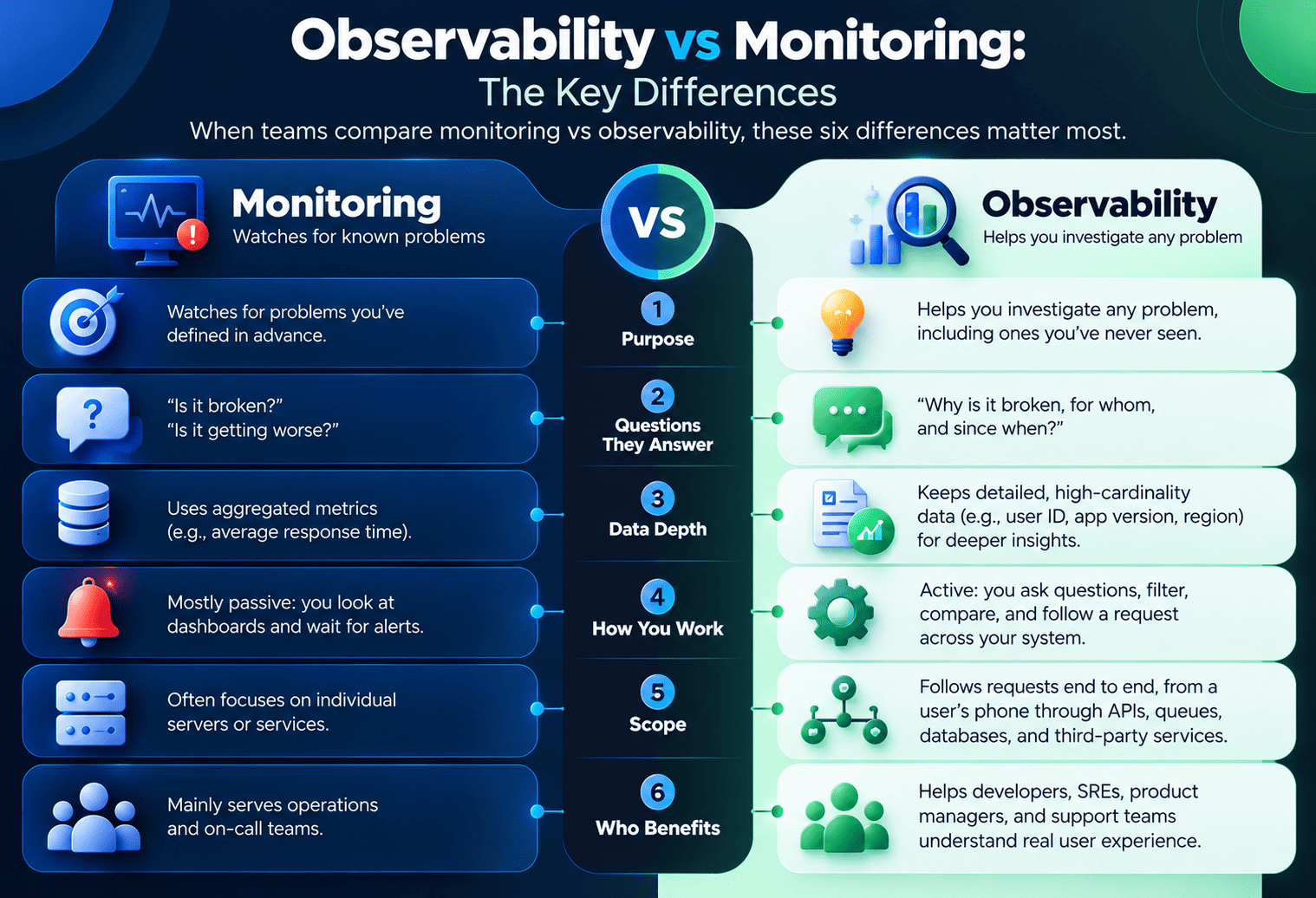
When teams compare monitoring vs observability, these six differences matter most.
1. Purpose
Monitoring watches for problems you’ve defined in advance. Observability helps you investigate any problem, including ones you’ve never seen.
2. The Questions They Answer
Monitoring answers “Is it broken?” and “Is it getting worse?” Observability answers “Why is it broken, for whom, and since when?”
3. Data Depth
Monitoring typically relies on aggregated metrics, like an average response time. Observability keeps detailed, high-cardinality data, such as user ID, app version, region, or customer account, so you can slice problems in ways you didn’t plan for.
4. How You Work
Monitoring is mostly passive: you look at dashboards and wait for alerts. Observability is active: you ask questions, filter, compare, and follow a request across your system.
5. Scope
Monitoring often focuses on individual servers or services. Observability follows requests end to end, from a user’s phone through APIs, queues, databases, and third-party services.
6. Who Benefits
Monitoring mainly serves operations and on-call teams. Observability helps developers, SREs, product managers, and support teams understand real user experience.
Is Monitoring Part of Observability?
Yes, in practice monitoring is built on top of observability. An observable system produces the data, and monitoring uses that data to watch for known problems and send alerts.
The two work best as a loop. Monitoring tells you something needs attention. Observability helps you find the cause. What you learn then feeds back into better monitoring, such as a new alert or a new dashboard.
Where SLOs Fit In
Service level objectives (SLOs) connect the two. An SLO sets a reliability target, like “99.9% of checkouts complete in under 2 seconds.” Monitoring alerts you when you’re burning through your error budget too fast, and observability helps you find out what’s burning it. Alerting on SLOs, which are user-facing symptoms, instead of every CPU spike also cuts down on alert fatigue.
Do You Need Observability, or Is Monitoring Enough?
Monitoring may be enough if you run a small, stable application, such as a single server or a simple monolith with few moving parts and infrequent releases.
You need observability when:
- You run microservices, containers, or serverless functions, where one request touches many components.
- You release often, so new failure modes appear regularly.
- Your product spans mobile apps, web apps, and backend services, and problems can start anywhere.
- You serve many customers on one platform and need to see problems for one tenant without guessing.
- You’ve added AI or LLM features, where you need to track prompts, model latency, token costs, and output quality.
- Incidents take too long to resolve because nobody can see what’s happening across systems.
For most modern cloud applications, the honest answer is that you need both.
Monitoring and Observability Tools
| Category | Popular Tools | Notes |
| Metrics and alerting | Prometheus, Amazon CloudWatch, Azure Monitor, Google Cloud Monitoring | Core monitoring building blocks |
| Dashboards | Grafana | Visualizes metrics, logs, and traces together |
| Instrumentation standard | OpenTelemetry | Vendor-neutral collection of all telemetry |
| Distributed tracing | Jaeger, Grafana Tempo | Follows requests across services |
| Log management | Grafana Loki, Elastic (ELK) Stack | Searches and analyzes logs |
| Full observability platforms | Datadog, New Relic, Dynatrace, Honeycomb, Splunk Observability | All-in-one, with different pricing and strengths |
| Error and crash tracking | Sentry | Ties errors in web and mobile apps to code and releases |
Prometheus is often the first tool teams adopt for metrics and alerting, and pairing it with Grafana and OpenTelemetry gives you a capable open-source stack.
Our guide to open source web application development covers how to pick and maintain open-source tools like these safely.
How to Build Observability Into Your Systems
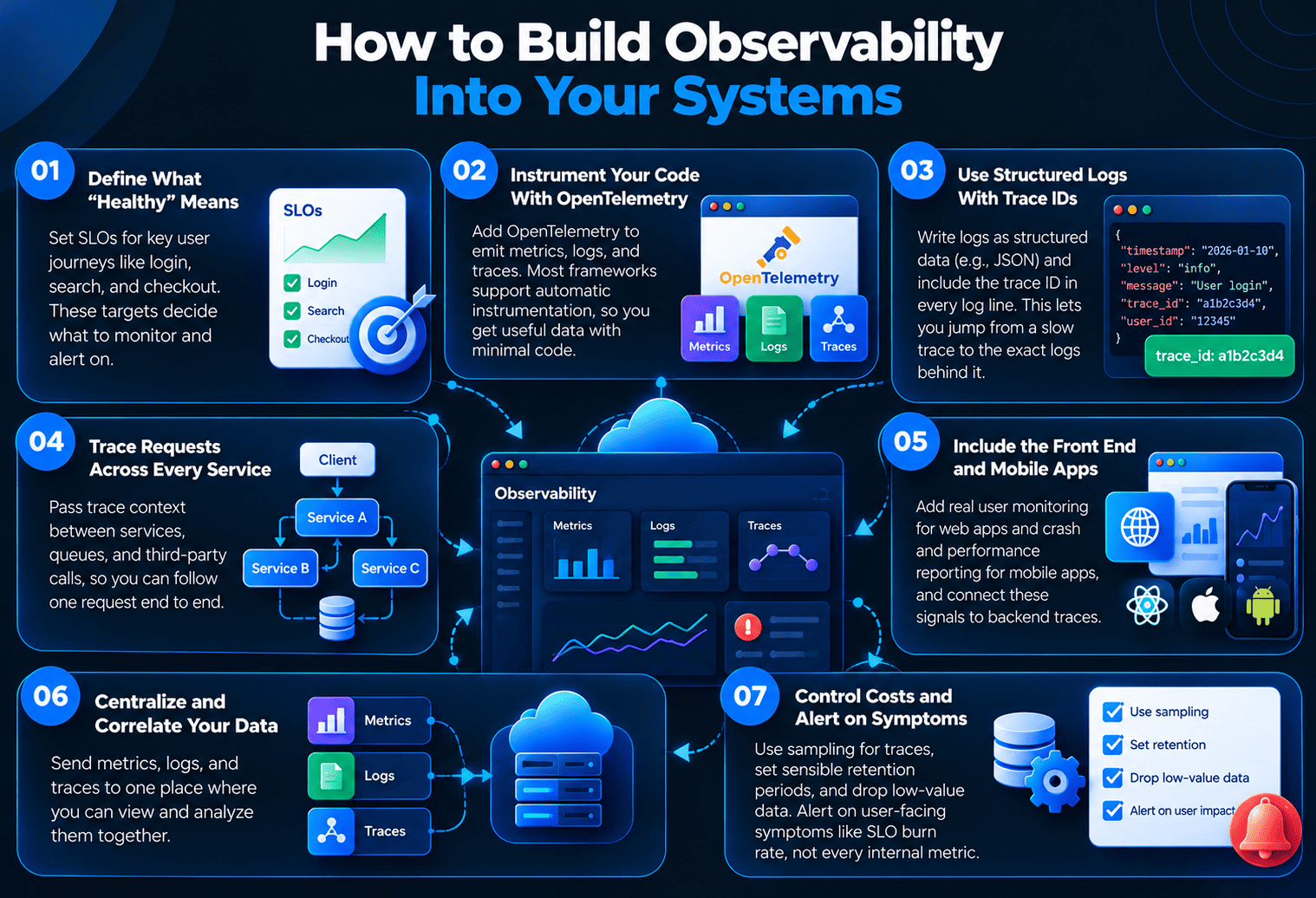
Step 1: Define What “Healthy” Means
Start with SLOs for the user journeys that matter most, like login, search, and checkout. These targets decide what you monitor and alert on.
Step 2: Instrument Your Code With OpenTelemetry
Add OpenTelemetry to your services so they emit metrics, logs, and traces in a standard format. Many frameworks support automatic instrumentation, so you get useful data with little code.
Step 3: Use Structured Logs With Trace IDs
Write logs as structured data, such as JSON, and include the trace ID in every log line. That single habit lets you jump from a slow trace to the exact logs behind it. Teams building new services with solid API and backend development practices bake this in from day one.
Step 4: Trace Requests Across Every Service
Make sure trace context passes between services, queues, and third-party calls, so one request can be followed end to end.
Step 5: Include the Front End and Mobile Apps
Many problems start on users’ devices. Add real user monitoring for web apps and crash and performance reporting for mobile apps, then connect those signals to backend traces. Our mobile app development team builds this telemetry into apps before launch.
If your mobile backend runs on Firebase, our comparison of Firebase vs a custom backend explains how monitoring options differ between the two.
Step 6: Centralize and Correlate Your Data
Send telemetry to one place where metrics, logs, and traces can be viewed together. In cloud environments, our Cloud App Development team designs this pipeline alongside the infrastructure itself.
Step 7: Control Costs and Alert on Symptoms
Telemetry can get expensive fast. Use sampling for traces, set sensible retention periods, and drop low-value data. Then alert on user-facing symptoms, like SLO burn rate, rather than every internal metric.
Common Mistakes to Avoid
- Buying a tool and calling it observability. Without good instrumentation and context, even the best platform shows you very little.
- Collecting everything and keeping it forever. Costs balloon, and the useful signal gets buried.
- Alerting on causes instead of symptoms. Hundreds of CPU alerts create fatigue, while users stay unhappy.
- Leaving logs unstructured and unlinked. Free-text logs without trace IDs slow down every investigation.
- Ignoring the client side. If you only watch servers, you’ll miss problems that happen on users’ phones and browsers.
- Forgetting tenant context. In SaaS products, data without a customer or tenant ID makes it hard to see who’s affected. Our comparison of multi-tenant vs single-tenant SaaS covers how architecture choices affect this.
How The Apps Developers Can Help
We build monitoring and observability into products from the start, not as an afterthought. Our DevOps practice uses tools like Prometheus, Grafana, and Sentry, alongside infrastructure as code with Terraform and automated pipelines with GitHub Actions, so every release is visible and every incident is easier to trace. Projects start with a written scope and move in two-week sprints, so you can see reliability improve as the product grows.
Conclusion
Observability vs monitoring isn’t a choice between two competing tools. Monitoring is your alarm system, and observability is the ability to walk into the building and see exactly what’s happening. Modern cloud, web, and mobile products need both: monitoring to catch problems fast, and observability to fix them fast and learn from them.
Want your next product to be easy to run and quick to debug? Book a free consultation with The Apps Developers, and we’ll help you design monitoring and observability that fit your architecture and budget.
Frequently Asked Questions
What is the main difference between observability and monitoring?
Monitoring tells you when something is wrong by tracking predefined metrics and alerts. Observability helps you understand why it’s wrong by exploring detailed, connected telemetry like logs, metrics, and traces.
Is monitoring a subset of observability?
In practice, yes. An observable system produces rich data, and monitoring uses part of that data to watch for known problems and send alerts. Monitoring is an activity, while observability is a property of the system.
What are the three pillars of observability?
The three pillars of observability are metrics, logs, and traces. Many teams now add events and continuous profiling, and the real value comes from connecting all of these signals together.
Is observability the same as APM?
No. Application performance monitoring (APM) tracks application performance using predefined metrics and traces. Observability is broader, letting you investigate any question about your system across applications, infrastructure, and user devices.
What is OpenTelemetry?
OpenTelemetry is an open-source, vendor-neutral framework for collecting metrics, logs, and traces. It’s the industry standard for instrumenting applications, so you can switch observability tools without rewriting your code.
Do small applications need observability?
Not always. A small, stable application can often run well with basic monitoring. Observability becomes essential as systems grow into microservices, add mobile clients, release frequently, or serve many customers.
What are the four golden signals of monitoring?
The four golden signals, from Google’s SRE book, are latency, traffic, errors, and saturation. Together they give a quick view of the health of any user-facing system.
How much does observability cost?
Costs depend mostly on how much telemetry you collect and keep. Sampling traces, limiting retention, dropping low-value data, and using open-source tools like Prometheus and Grafana can keep costs under control.