
To build an AI agent with Python for an enterprise workflow, start with one bounded process, let your code control the workflow while the model makes decisions only at specific steps, give the agent narrow typed tools with least-privilege access, add human approval for risky actions, and test, trace, and monitor every run. Frameworks like LangGraph, the OpenAI Agents SDK, Microsoft Agent Framework, and Pydantic AI help, but the architecture around the model matters far more than the model itself.
Here’s a pattern we keep seeing. A team builds an agent demo in two weeks. It reads emails, looks up orders, drafts replies, and everyone in the room is impressed. Then someone asks, “What happens if it refunds the wrong customer?” and the room goes quiet. The demo worked. The system around it didn’t exist yet.
That gap is why so many agent projects stall. Gartner predicts that over 40% of agentic AI projects will be canceled by the end of 2027, citing rising costs, unclear business value, and weak risk controls.
This guide is about building the other kind, the agents that make it to production and stay there. It’s based on how our team approaches agent work when clients hire Python developers from us for AI and automation projects.
What Is an AI Agent?
An AI agent is software that uses a large language model to decide what to do next, calls tools such as APIs or databases to take actions, observes the results, and repeats until it reaches a goal or hands off to a human.
The difference from a chatbot is action. A chatbot answers questions. An agent does things: it files the ticket, updates the CRM, drafts the contract, or routes the claim. That’s what makes agents valuable, and it’s exactly what makes them risky.
AI Agents vs Workflow Automation vs Chatbots
| Chatbot | Workflow Automation | AI Agent | |
| What it does | Answers questions | Runs fixed, predefined steps | Decides steps and takes actions |
| Handles messy input | Somewhat | No | Yes |
| Predictability | Medium | Very high | Lower, needs guardrails |
| Best for | Support and FAQs | Stable, rule-based processes | Judgment calls inside a process |
| Example | “What’s my order status?” | “Every Friday, export this report” | “Review this claim and route it correctly” |
Why Python Is the Default Language for AI Agents
Python sits at the center of the AI ecosystem. Every major model provider ships a Python SDK first, nearly every agent framework is Python-native, and the same language handles your data pipelines, retrieval, validation, and evaluation. That means one team, one codebase, and fewer handoffs.
It isn’t perfect. Python can get slow inside tight loops, and agents that block on network calls waste workers. In practice, async clients, queues, caching, and keeping heavy compute in specialized services solve most of that. For enterprise agents, the bottleneck is almost never Python. It’s usually integrations, data quality, and unclear ownership.
When You Shouldn’t Build an AI Agent
This section saves more money than any other in this guide. Don’t build an agent when:
- The rules are already clear. If a process can be written as “if X, then Y,” use regular code or workflow automation. It’s cheaper, faster, and fully predictable.
- Every mistake is catastrophic and irreversible. Agents make errors. If you can’t add a human check or undo an action, keep a person in charge.
- The data is a mess. An agent will confidently act on bad data. Fix the data first.
- Nobody owns the outcome. If no business owner will answer for what the agent decides, it isn’t ready for production.
The sweet spot is a high-volume process with a few judgment calls in the middle, such as triaging support tickets, reviewing invoices against purchase orders, or classifying and routing documents.
Enterprise AI Agent Architecture: The Layers That Matter
A production AI agent is mostly not the model. It’s a stack of layers around the model that control what the agent can see, do, and remember, and that record everything it does.
| Layer | What It Does | Common Python Choices |
| Trigger | Starts a run from an event, queue, or schedule | Webhooks, Kafka, SQS, cron |
| Orchestration | Controls steps, branching, retries, and checkpoints | LangGraph, Temporal, Microsoft Agent Framework |
| Model gateway | Routes requests, handles fallbacks, enforces budgets | LiteLLM or a thin internal wrapper |
| Prompts and policies | Versioned instructions and business rules | Prompt files in Git, Jinja templates |
| Tools | Typed functions the agent is allowed to call | Pydantic-typed functions, MCP servers |
| Memory and state | Working context, history, and checkpoints | Postgres, Redis, pgvector |
| Identity and permissions | Gives each agent its own least-privilege identity | Service accounts, scoped OAuth tokens |
| Guardrails and approvals | Blocks unsafe actions and pauses for human review | Policy checks, approval states |
| Observability | Traces every model call, tool call, and decision | OpenTelemetry, Langfuse |
| Evaluation | Tests behavior before and after every change | pytest, custom eval sets |
Two design choices shape everything else.
First, decide who controls the flow. In a fully autonomous design, the model picks every next step. In a workflow-first design, your code defines the steps and the model only decides at specific points. For most enterprise processes, workflow-first wins. It’s easier to test, easier to audit, and cheaper to run.
Second, decide where state lives. Keep it outside the agent process, in a database. If a worker crashes halfway through, another one should pick up from the last checkpoint, not start over and email the customer twice.
Common AI Agent Design Patterns
| Pattern | How It Works | Good Fit For |
| Workflow with LLM steps | Code runs fixed steps, the model handles specific decisions | Most enterprise processes |
| Router | The model classifies a request and sends it to the right handler | Ticket triage, document routing |
| Single agent with tools | One agent loops through reasoning and tool calls | Research, lookups, simple tasks |
| Plan and execute | The model writes a plan, then executes steps one by one | Multi-step research or analysis |
| Supervisor with sub-agents | A lead agent delegates to specialist agents | Complex work across several domains |
| Evaluator and optimizer | One step drafts, another reviews and requests fixes | Content, code, and report quality |
Start with the simplest pattern that works. Multi-agent systems are exciting, but every extra agent adds cost, latency, and new ways to fail.
Best Python Frameworks for Building AI Agents in 2026
| Framework | Best For | Keep in Mind |
| LangGraph | Explicit graphs, checkpoints, human-in-the-loop | More design work upfront |
| OpenAI Agents SDK | Lightweight agents with handoffs, guardrails, and tracing | Most natural with OpenAI models |
| Microsoft Agent Framework | Graph workflows in Python and .NET, successor to AutoGen and Semantic Kernel | Newer, still maturing |
| Google ADK | Multi-agent systems on Gemini and Google Cloud | Strongest inside Google’s ecosystem |
| CrewAI | Role-based teams of agents | Harder to debug as crews grow |
| Pydantic AI | Type-safe agents with strict validation | Smaller ecosystem |
| LlamaIndex | Agents built around document retrieval and RAG | Best when knowledge retrieval is the core job |
| Claude Agent SDK | Agents that work with files, code, and tools | Most natural with Anthropic models |
So which one should you pick? Choose based on how your agent needs to behave, not on popularity. If you need explicit control and checkpoints, look at LangGraph or Microsoft Agent Framework. If retrieval over documents is the core job, LlamaIndex is a strong fit. If you’re committed to one model provider, its own SDK is often the shortest path.
Whatever you choose, wrap it. Agent frameworks change fast, and breaking updates are common. Keep a thin interface of your own between your business logic and the framework, so an upgrade, or a switch, doesn’t turn into a rewrite. Most of these frameworks are open source too, and our guide to open source web application development covers how to evaluate and track open-source dependencies safely.
Connecting Agents to Enterprise Systems: MCP and A2A
Two open standards now shape how agents connect to the rest of your stack.
The Model Context Protocol (MCP) gives agents a standard way to discover and use tools and data sources. Instead of writing custom glue code for every model, you expose a system once as an MCP server, and any compatible agent can use it. The MCP documentation explains the protocol and lists available servers.
The Agent2Agent (A2A) protocol handles a different problem: how agents built by different teams or vendors talk to each other and hand off tasks.
A word of caution. A standard connection is still a connection into your systems. Expose narrow, purpose-built tools through MCP, not your whole database, and put the same permission checks on MCP tools that you’d put on any API. Building those narrow, secure interfaces is classic API and backend development work, and it usually takes more effort than the agent itself.
How to Build an AI Agent with Python: Step by Step
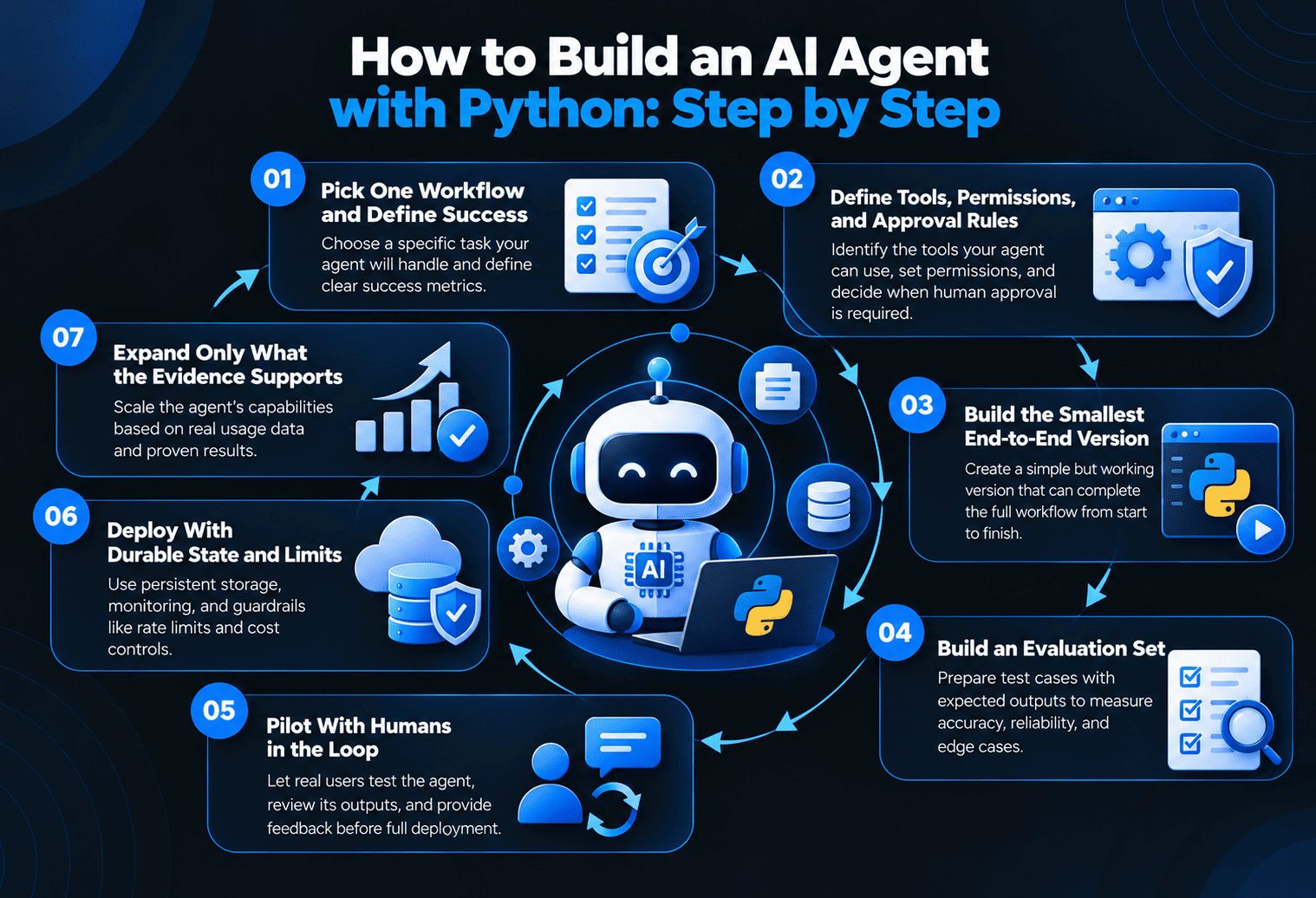
Step 1: Pick One Workflow and Define Success
Map a single process from trigger to outcome and mark the exact points that need judgment. Write down the inputs, tools, expected outputs, and how you’ll measure success, such as cutting handling time by a set percentage while keeping accuracy above an agreed level.
Step 2: Define Tools, Permissions, and Approval Rules
List every system the agent touches and expose only the actions it truly needs. Start read-only wherever possible. Decide upfront which actions need a human to approve them, like payments above a limit, access changes, or deletions.
Step 3: Build the Smallest End-to-End Version
Wire up one real path using real integrations. Keep the model’s job small and typed. Here’s a simplified example of a workflow-first refund agent, where the model makes one structured decision and the code enforces the business rules:
from typing import Literal
from pydantic import BaseModel, Field
class RefundDecision(BaseModel):
action: Literal[“approve”, “deny”, “escalate”]
amount: float = Field(ge=0)
reason: str
AUTO_APPROVE_LIMIT = 200.00
def handle_refund_request(ticket_id: str, llm, tools, audit_log):
# Read-only tools gather context first
ticket = tools.get_ticket(ticket_id)
order = tools.get_order(ticket.order_id)
# The model makes one bounded, typed decision
decision = llm.structured(
prompt=tools.render_prompt(“refund_policy_v3”, ticket=ticket, order=order),
schema=RefundDecision,
)
audit_log.record(ticket_id, step=”decision”, data=decision.model_dump())
# Code, not the model, enforces the business rules
if decision.action == “approve” and decision.amount <= AUTO_APPROVE_LIMIT:
return tools.issue_refund(order.id, decision.amount)
if decision.action == “deny”:
return tools.reply_to_customer(ticket_id, decision.reason)
return tools.queue_for_human_review(ticket_id, decision)
Notice what the model doesn’t do here. It doesn’t decide the refund limit, it can’t skip the audit log, and anything unusual goes to a person. Here, llm.structured stands for your own thin wrapper around whichever framework or provider you use.
Step 4: Build an Evaluation Set
Collect real historical cases, tricky edge cases, and known failures, along with the right answer for each. Run the whole set every time you change a prompt, model, or tool. Without this, you’re guessing whether a change made things better or worse.
Step 5: Pilot With Humans in the Loop
Launch to a small group or a slice of traffic, with people reviewing the agent’s decisions. Log every model call, tool call, and human correction. Those corrections become your next round of test cases.
Step 6: Deploy With Durable State and Limits
Run agents as containerized workers fed by queues, keep state in a database, and set hard limits on steps, tokens, and spending per run. Agents spend most of their time waiting on models and APIs, so use async clients and scale on queue depth, not just CPU.
Step 7: Expand Only What the Evidence Supports
Once the agent hits its targets consistently, widen its permissions or add the next workflow. Add more agents only when one agent genuinely can’t handle the job.
Securing AI Agents: The OWASP Risks That Matter Most
The biggest security risk with AI agents is that they act on instructions they read, so a malicious email, document, or web page can try to steer them. The OWASP Top 10 for LLM Applications is the best starting point for threat modeling. Here are the risks we see matter most for enterprise agents, and how to handle them.
| Risk | What It Looks Like | How to Control It |
| Prompt injection | A document tells the agent to “ignore previous instructions” | Treat all retrieved content as untrusted, separate instructions from data, require approval for sensitive actions |
| Excessive agency | The agent has more permissions than its job needs | Least-privilege identity per agent, narrow tools, read-only by default |
| Sensitive information disclosure | Private data leaks into outputs or logs | Data masking, output filtering, access checks on retrieval |
| Improper output handling | Model output is executed or stored without checks | Validate every output against a schema before acting |
| Unbounded consumption | Loops or long contexts run up huge bills | Step, token, and spending limits per run |
| Supply chain | Compromised packages, models, or plugins | Pin versions, scan dependencies, review MCP servers before use |
If your agents serve many customers from one platform, tenant isolation matters too. An agent working for one client must never retrieve another client’s data. Our comparison of multi-tenant vs single-tenant SaaS covers how to keep that separation strong.
Evaluating and Monitoring AI Agents in Production
Traditional monitoring tells you whether a service is up. It can’t tell you why an agent picked the wrong tool. You need to track agent behavior directly.
| What to Measure | Why It Matters |
| Task success rate | The single best measure of whether the agent works |
| Tool-call accuracy | Shows whether the agent picks the right actions |
| Escalation rate | Too high wastes people’s time, too low may hide errors |
| Human correction rate | Your best source of new test cases |
| Latency per run | Affects user experience and worker costs |
| Cost per completed task | Keeps the business case honest |
Trace every run end to end with one ID that links model calls, tool calls, decisions, and human reviews. Reliable DevOps and cloud solutions make that tracing, along with deployment, scaling, and alerting, part of the platform instead of an afterthought.
Governance: Who Answers for the Agent?
Logs can show what an agent did. They can’t say who’s accountable for it. Before launch, name a business owner for every agent and write down what it may decide alone, what needs approval, and where exceptions go.
For a structured approach, the NIST AI Risk Management Framework gives enterprises a widely recognized way to map, measure, and manage AI risks. Many governance and compliance teams already use it, which makes approvals smoother.
Agents also need to fit into the rest of your enterprise setup, from single sign-on to device management for the apps employees use to review agent decisions. Our enterprise mobile app development guide covers those layers.
How The Apps Developers Builds Enterprise AI Agents
We approach agents the way we approach any production system: start small, prove value, then scale. Our team works across Python, backend integrations, cloud infrastructure, and web and mobile front ends, so the agent, the systems it touches, and the screens people use to supervise it are built together.
If you need specialists to join your team, you can hire an LLM developer from us to design prompts, retrieval, evaluation, and agent workflows alongside your engineers. Every engagement starts with a written scope and moves in two-week sprints with working demos, so you can see the agent improve against your own test cases.
Conclusion
Building AI agents with Python is the easy part. Building agents that an enterprise can trust takes architecture: workflow-first control, narrow tools, least-privilege identities, human approval where it counts, real evaluation, and full tracing. Start with one workflow, measure everything, and let the evidence decide how much autonomy the agent earns.
Planning an AI agent for one of your workflows? Book a free consultation with The Apps Developers, and we’ll help you pick the right first use case and map a realistic path to production.
Frequently Asked Questions
What is the best Python framework for building AI agents?
There’s no single best framework. LangGraph and Microsoft Agent Framework suit explicit, checkpointed workflows, LlamaIndex suits retrieval-heavy agents, and provider SDKs like the OpenAI Agents SDK are quickest if you use one model provider.
Is Python good for building AI agents?
Yes. Python is the default language for AI agents because model providers, agent frameworks, and data and evaluation tools all support it first. Performance limits are usually solved with async code, queues, and caching.
How do you keep AI agents secure in an enterprise?
Give each agent its own least-privilege identity, expose only narrow typed tools, treat retrieved content as untrusted, validate every output, require human approval for risky actions, and set limits on steps and spending.
What is the Model Context Protocol (MCP)?
MCP is an open standard that lets AI agents connect to tools and data sources in a consistent way. You expose a system once as an MCP server, and any compatible agent can use it with the right permissions.
Should I use a single agent or multiple agents?
Start with a single agent or a workflow with model steps. Move to multiple agents only when one agent clearly can’t handle the work, since each extra agent adds cost, latency, and new failure points.
How long does it take to build an enterprise AI agent?
A focused pilot for one workflow often takes a few weeks to a few months. Timelines grow with the number of integrations, data readiness, security reviews, and how much human approval the process needs.