
Mobile apps have become an important part of how businesses connect with customers, sell products, deliver services, manage operations, and improve user experiences. From ecommerce platforms and banking solutions to healthcare applications and enterprise tools, businesses use mobile applications for different purposes.
However, not all mobile apps are built in the same way. The type of application and the technology approach behind it can affect development cost, performance, scalability, maintenance requirements, and user experience during mobile application development.
When discussing types of mobile apps, businesses usually look at two areas: the purpose of the application and the development approach used to build it. Ecommerce, healthcare, finance, and social apps describe what an application does, while native, hybrid, and cross-platform applications describe how the application is developed.
Understanding these differences helps businesses choose the right mobile app type based on their goals, budget, required features, platform requirements, and long-term growth plans.
What Are The Different Types Of Mobile Apps?
Mobile app types refer to the different categories and development approaches used to create applications for smartphones and tablets.
Apps can be categorized based on their purpose, such as ecommerce apps, finance apps, healthcare apps, gaming apps, and enterprise applications. They can also be categorized based on the technology approach used for development, including native, hybrid, and cross-platform apps.
Each type has different advantages, limitations, development requirements, and costs. The right choice depends on factors such as app complexity, target users, performance expectations, budget, timeline, and future scalability.
A simple content-based application may not require the same development approach as a banking application that handles sensitive information or a gaming application that requires advanced performance and graphics.
Types Of Mobile Apps Based On Purpose
Businesses develop mobile applications for different goals, industries, and user needs. The purpose of an app usually determines the required features, integrations, security requirements, and overall development effort.
Ecommerce Apps
Ecommerce apps allow users to browse products, manage shopping carts, complete payments, and track orders through mobile devices. These applications commonly include product catalogs, search functionality, customer accounts, payment integrations, and order management features.
Finance Apps
Finance apps include banking applications, digital wallets, payment platforms, and investment solutions. These applications usually require strong authentication, secure data handling, transaction processing, and compliance considerations.
Healthcare Apps
Healthcare applications support services such as online consultations, appointment booking, fitness tracking, and patient management. These apps often require secure data storage and integrations with healthcare systems.
Social Media Apps
Social media applications help users communicate, share content, and build communities. Common features include messaging, user profiles, notifications, media sharing, and content feeds.
On-Demand Apps
On-demand apps connect users with services such as food delivery, transportation, home services, and booking platforms. These applications often require location services, payment integration, notifications, and real-time updates.
Enterprise Apps
Enterprise mobile applications help organizations manage workflows, employee communication, reporting, and internal business operations through mobile devices.
Gaming Apps
Gaming applications range from simple casual games to advanced multiplayer experiences. Their development usually focuses on performance, animations, graphics, and device capabilities.
Types Of Mobile App Development Approaches
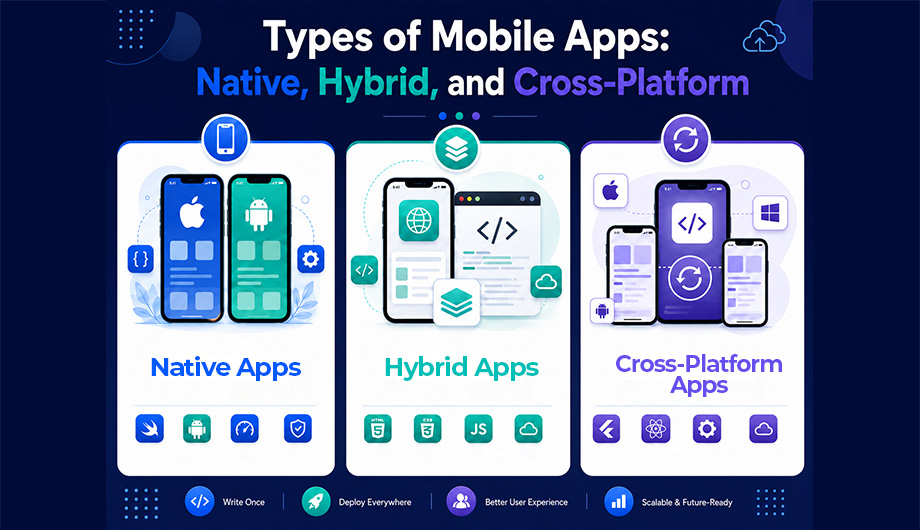
While mobile apps can serve different purposes, they are commonly developed using three main approaches:
- Native mobile apps
- Hybrid mobile apps
- Cross-platform mobile apps
These approaches define how an application is built, maintained, and optimized across different operating systems. Each approach has different advantages, limitations, costs, and suitable use cases.
What Are Native Apps?
Native mobile apps are built specifically for one operating system, such as Android or iOS. Android native apps are usually developed using Kotlin or Java. iOS native apps are commonly built using Swift.
Because native apps are created for one platform, they can fully use the features, tools, and design standards of that operating system. This gives users a smooth and natural experience.
Key Features
Native apps offer high performance and fast response times. They can easily access device hardware such as the camera, GPS, microphone, contacts, sensors, and push notifications. They also follow platform specific design rules, which helps the app feel familiar to users.
Advantages
The biggest advantage of native apps is performance. They are usually faster and more stable than other app types. They also provide better security because developers can use platform level security tools.
Native apps also offer strong UI and UX consistency. An Android app can follow Android design standards, while an iOS app can follow Apple design standards. This improves usability and trust.
Disadvantages
Native development can be expensive. Businesses often need separate development teams for Android and iOS. This means two codebases, two testing processes, and more time for updates.
Native apps also take longer to develop when the business wants to launch on both major platforms at the same time.
Best Use Cases
Native apps are best for banking apps, gaming apps, high performance enterprise apps, apps with advanced security needs, and apps that need deep access to device hardware.
What Are Hybrid Apps?
Hybrid mobile apps are built using web technologies such as HTML, CSS, and JavaScript. The app is then wrapped inside a native container so it can be installed on mobile devices like a normal app.
This approach allows developers to create one app that can run on multiple platforms. Frameworks such as Ionic and Cordova are often used for hybrid app development.
Key Features
Hybrid apps use a single codebase. This means the same core code can work across Android and iOS. They are useful when businesses want to launch quickly and control development costs.
Hybrid apps can also connect with some device features through plugins. For example, they may access the camera, location, or storage, depending on the framework and plugin support.
Advantages
The main advantage of hybrid apps is faster development. Since developers do not need to build separate apps for Android and iOS, the project can move quicker.
Hybrid apps are also more affordable than native apps in many cases. Maintenance is easier because most updates are made in one codebase. This makes hybrid apps suitable for small businesses, early stage ideas, and simple digital products.
Disadvantages
Hybrid apps usually do not perform as well as native apps. They may feel slower when handling complex animations, heavy data, or advanced features.
Access to device features can also be limited. Some plugins may not work perfectly on every platform. The user interface may also feel less smooth compared to native apps.
Best Use Cases
Hybrid apps are best for simple business apps, content based apps, internal company tools, MVPs, prototypes, and apps that do not require advanced performance.
What Are Cross-Platform Apps?
Cross-platform mobile apps use one codebase for both Android and iOS. They are built using frameworks such as Flutter and React Native. Unlike basic hybrid apps, many cross-platform apps can deliver a near native experience.
This approach has become popular because it gives businesses a balance between cost, speed, and performance. Instead of building two separate native apps, developers can create one shared codebase and adjust parts of the app where needed.
Key Features
Cross-platform apps offer near native performance in many use cases. They also support shared development, which saves time and reduces repeated work.
Frameworks like Flutter and React Native have strong developer communities, useful libraries, and regular updates. They also support modern UI design, animations, and integrations with many third party tools.
Advantages
Cross-platform development is more cost effective than full native development. Since one codebase supports both Android and iOS, businesses can launch faster and manage updates more easily.
Another advantage is UI consistency. The app can look and feel similar across platforms, which is useful for brands that want a unified customer experience.
Cross-platform apps are also easier to maintain. Bug fixes, feature updates, and design changes can often be handled once instead of twice.
Disadvantages
Cross-platform apps may have slight performance trade offs in very complex apps. For example, advanced games, heavy animations, or apps with deep hardware use may still perform better as native apps.
Some advanced native features may require extra platform specific development. Businesses also depend on the chosen framework. If the framework changes, loses support, or creates compatibility issues, it can affect future development.
Best Use Cases
Cross-platform apps are suitable for startup MVPs, e-commerce apps, social media apps, on demand service apps, booking apps, education apps, and many business platforms that need strong performance without the full cost of native development.
Native vs Hybrid vs Cross-Platform Comparison
Choosing between native, hybrid, and cross-platform depends on factors such as performance requirements, budget, timeline, and future scalability.
|
Feature |
Native |
Hybrid |
Cross-Platform |
|
Performance |
Highest |
Medium |
High |
|
Cost |
High |
Low |
Medium |
|
Development Speed |
Slow |
Fast |
Fast |
|
UX Quality |
Best |
Average |
Near native |
|
Codebase |
Separate |
Single |
Single |
Businesses should compare these options based on their goals, not only on cost. A low cost app may become expensive later if it performs poorly or cannot scale. At the same time, a fully native app may not be necessary for a simple business tool.
There is no one size fits all solution. The best choice depends on app complexity, user expectations, budget, timeline, and long term plans.
Which Mobile App Type Should You Choose For Your Business?
The right mobile app development approach depends on your business goals, required features, target users, budget, and long-term plans.
|
Requirement |
Recommended Approach |
|
Maximum performance and advanced hardware usage |
Native |
|
Fast launch on Android and iOS |
Cross-Platform |
|
Limited initial budget |
Hybrid or Cross-Platform |
|
MVP validation |
Cross-Platform |
|
Complex gaming or high-performance applications |
Native |
|
Simple internal business applications |
Hybrid |
Native development is usually suitable when performance, security, and platform-specific capabilities are the highest priorities.
Hybrid development can work well for simpler applications where faster delivery and lower initial cost are more important.
Cross-platform development is often suitable for businesses that need a balance between performance, development speed, and cost while supporting multiple platforms.
The best choice depends on the application’s requirements rather than selecting one approach for every project.
Conclusion
Native, hybrid, and cross-platform apps each serve different business needs. Native apps provide the highest performance, security, and platform-specific experience but usually require more development effort. Hybrid apps can provide faster and lower-cost solutions for simpler applications, while cross-platform apps offer a balance between performance, development speed, and cost.
Choosing the right mobile app type requires understanding your business goals, users, features, budget, platform requirements, and future growth plans. A well-planned approach can help reduce unnecessary development effort, improve user experience, and create a scalable mobile solution.
Frequently Asked Questions
Are hybrid apps still used today?
Yes, hybrid apps are still used for applications where faster development, lower initial cost, and simpler functionality are more important than advanced performance requirements.
Which mobile app type is best for startups?
Cross-platform development is often considered by startups because it allows businesses to test ideas on multiple platforms while reducing duplicated development effort.