

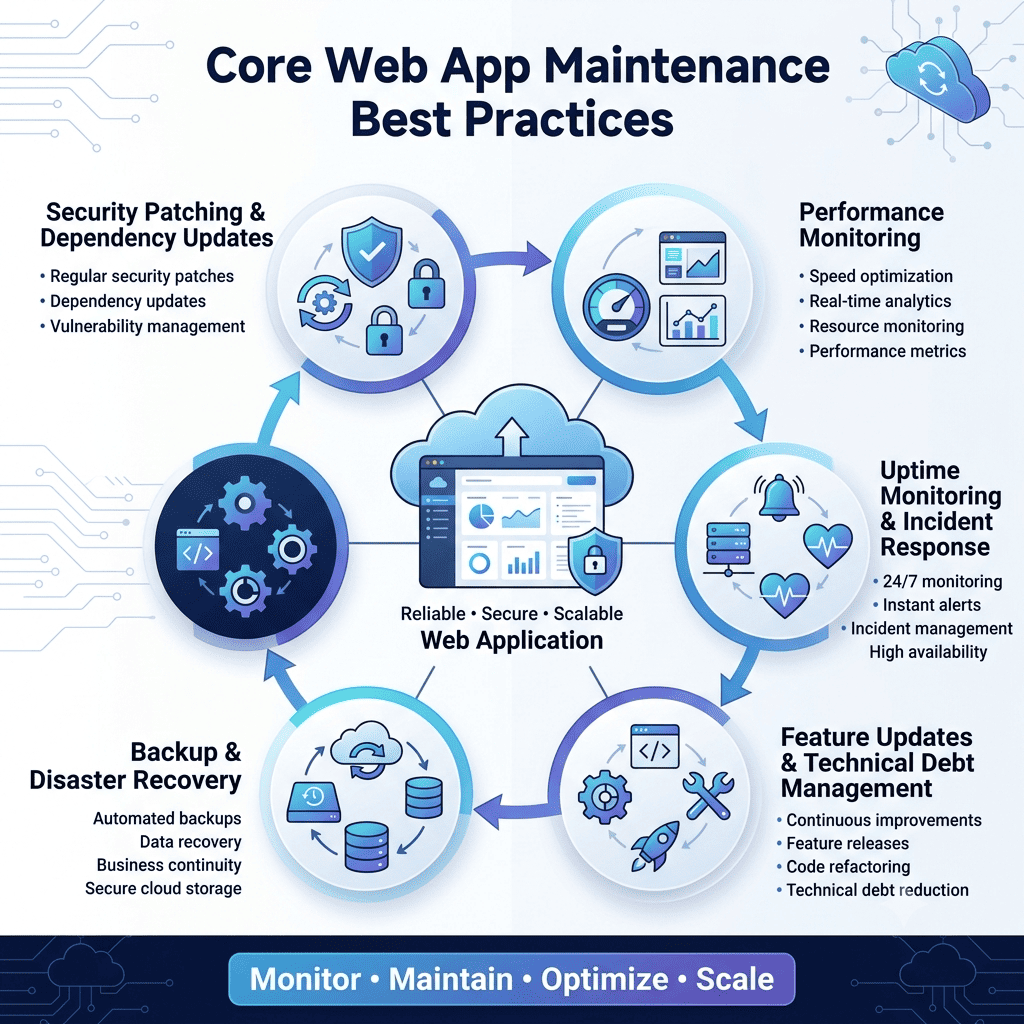
Web app maintenance best practices center on four ongoing commitments: regular security patching and dependency updates, continuous performance and uptime monitoring, a real backup and disaster recovery plan, and a deliberate process for managing technical debt before it becomes a rebuild. Skipping any one of these doesn’t cause an immediate failure, it causes a slow decay that eventually shows up as an outage, a breach, or a codebase nobody wants to touch.
Launch day gets all the attention, and post-launch maintenance gets whatever budget and focus is left over, which is backwards given how much of a web app’s actual lifetime happens after that first release. This guide is for the stage right after launch, when the decisions about how seriously to treat maintenance are still cheap to make well.
What Is Web App Maintenance?
Web app maintenance is the ongoing work required to keep a live application secure, performant, and functional after its initial release, covering everything from patching dependencies to fixing bugs to adapting the system as usage grows. It’s distinct from new feature development, though the two often get budgeted together and shouldn’t be, since maintenance work that gets treated as optional whenever a feature deadline is tight is exactly how technical debt accumulates.
Why Web App Maintenance Best Practices Matter After Launch
A web app isn’t a static asset once it ships. Dependencies it was built on get security patches, and skipping those patches leaves known vulnerabilities sitting in production. Usage patterns shift as the user base grows, exposing performance bottlenecks nobody could have found in testing. Browsers and devices update, occasionally breaking something that worked fine the week before. None of this is a sign something went wrong at launch, it’s just what happens to any piece of running software over time, and treating it as an occasional afterthought rather than an ongoing discipline is where most post-launch problems actually originate.
There’s a business cost angle too. An unpatched vulnerability that leads to a breach, or a performance regression that quietly drags down conversion, both cost far more to deal with after the fact than the maintenance work that would have prevented them. Our Core Web Vitals guide is a good example of the kind of thing that degrades silently without ongoing monitoring, a page that scored well at launch can drift out of “good” territory within months as new features and content get added.
Core Web App Maintenance Best Practices
1. Security Patching and Dependency Updates
Every framework, library, and package a web app depends on eventually gets a security patch, and the gap between a patch being released and it being applied is exactly the window an attacker looks for. A regular patching cadence, not an occasional “we should probably update things” cleanup, is the single highest-leverage maintenance habit a team can build. The OWASP Dependency-Check project is a reasonable starting point for teams that don’t yet have automated dependency scanning in place.
2. Performance Monitoring
Performance doesn’t stay fixed once it’s optimized at launch. New features add weight, third-party scripts accumulate, and database queries that were fine at a smaller scale slow down as data volume grows. Real user monitoring, not just a one-time Lighthouse audit, catches this drift before it shows up as a ranking drop or a support ticket.
3. Uptime Monitoring and Incident Response
Knowing an outage happened before a customer tells you about it is the baseline expectation for any production web app. That means real uptime monitoring with alerting, and a documented incident response process so a 2 a.m. outage doesn’t depend on one person remembering the right steps from memory under pressure.
4. Backup and Disaster Recovery
A backup strategy that’s never been tested isn’t really a backup strategy, it’s an assumption. Regular, automated backups paired with an actual periodic restore test are what separates a real disaster recovery plan from one that only looks good in a document nobody’s opened since it was written.
5. Feature Updates vs. Technical Debt Management
Understanding Technical Debt
Technical debt is the accumulated cost of shortcuts taken during development, quick fixes, skipped refactoring, outdated patterns, that make future changes slower and riskier the longer they go unaddressed. Some technical debt is a reasonable tradeoff made deliberately to hit a launch date. The problem is debt that accumulates invisibly because nobody’s tracking it.
When Technical Debt Becomes a Rebuild Risk
Debt crosses from manageable to dangerous once it starts actively blocking new feature work, when a team spends more time working around old code than building on top of it. That’s usually the signal that a focused remediation effort, not just business as usual, is overdue.
Example: A Legacy Dependency Left Unpatched
A payment library that hasn’t been updated in two years because updating it would break three other things it’s tangled up with is a textbook case of technical debt turning into active risk, since it’s now both a security liability and an increasingly expensive fix the longer it’s left alone.
In-House vs. Outsourced Web App Maintenance
This is a real decision point for most growing businesses, and the right answer depends more on team maturity than company size.
Factor | In-House Maintenance | Outsourced Maintenance |
Cost structure | Fixed salary cost regardless of workload | Scales with actual maintenance need |
Coverage | Limited to team’s working hours unless staffed for it | Often includes after-hours and weekend coverage |
Institutional knowledge | Strong, team already knows the codebase | Requires onboarding, though this shortens over time |
Best fit | Teams with steady, predictable maintenance workload | Teams with variable workload or no dedicated ops capacity |
Risk | Single points of failure if key people leave | Dependent on vendor responsiveness and contract terms |
Many growing teams land on a hybrid: core product knowledge stays in-house, while security patching, monitoring, and after-hours incident response get handled by a dedicated maintenance partner, since that coverage is expensive to staff internally for a workload that isn’t constant.
How Much Should You Budget for Web App Maintenance?
A commonly used rule of thumb is budgeting somewhere around 15 to 20 percent of the original build cost annually for ongoing maintenance, though this varies with how actively the product continues to evolve and how much technical debt it’s carrying. Our custom web application development cost guide covers this in more detail alongside the build-cost side of the equation, since the two numbers are meant to be planned together, not treated as separate budget lines that never talk to each other.
Common Web App Maintenance Mistakes
Teams frequently treat maintenance as a line item to cut when budgets tighten, which trades a short-term saving for a longer-term, more expensive problem. Dependency updates get delayed indefinitely because “if it’s not broken, don’t touch it,” right up until a delayed update becomes a security incident. Monitoring gets set up at launch and then never revisited as the system evolves, so alerts either go stale or stop firing on the conditions that actually matter now. And technical debt gets tracked informally, if at all, so nobody has a clear picture of how much risk is actually accumulating until it surfaces as a real production problem.
How The Apps Developers Approaches Web App Maintenance
Maintenance planning is part of the same conversation we have about any web app build, not a separate contract negotiated after the fact once something’s already gone wrong. That includes the DevOps and cloud infrastructure work that ongoing monitoring, backups, and incident response actually depend on, built in from the start rather than retrofitted under pressure.
If your current web app doesn’t have a real maintenance plan, or you’re not confident what’s actually being monitored, that’s worth a direct conversation before it becomes an incident. You’re welcome to talk to our team about what proper post-launch coverage would look like for your specific application.